Final Poster Comic: Patrick Istvan

I am a fan of mythology and remember reading about Thor’s battle with Jormungandr, the world serpent.  I originally wanted to make the poster much bigger but found it way too difficult so I stuck with my original sketch which is just about setting the bait to fish for Jormungandr. My comic challenges the readers left to right top to bottom reading because there are few discernible gutters. The closest thing is a line dividing the top right and bottom panels but I filled it with random Nordic runes to offer more immersion. Jormungandr’s tail also seems to be almost trans
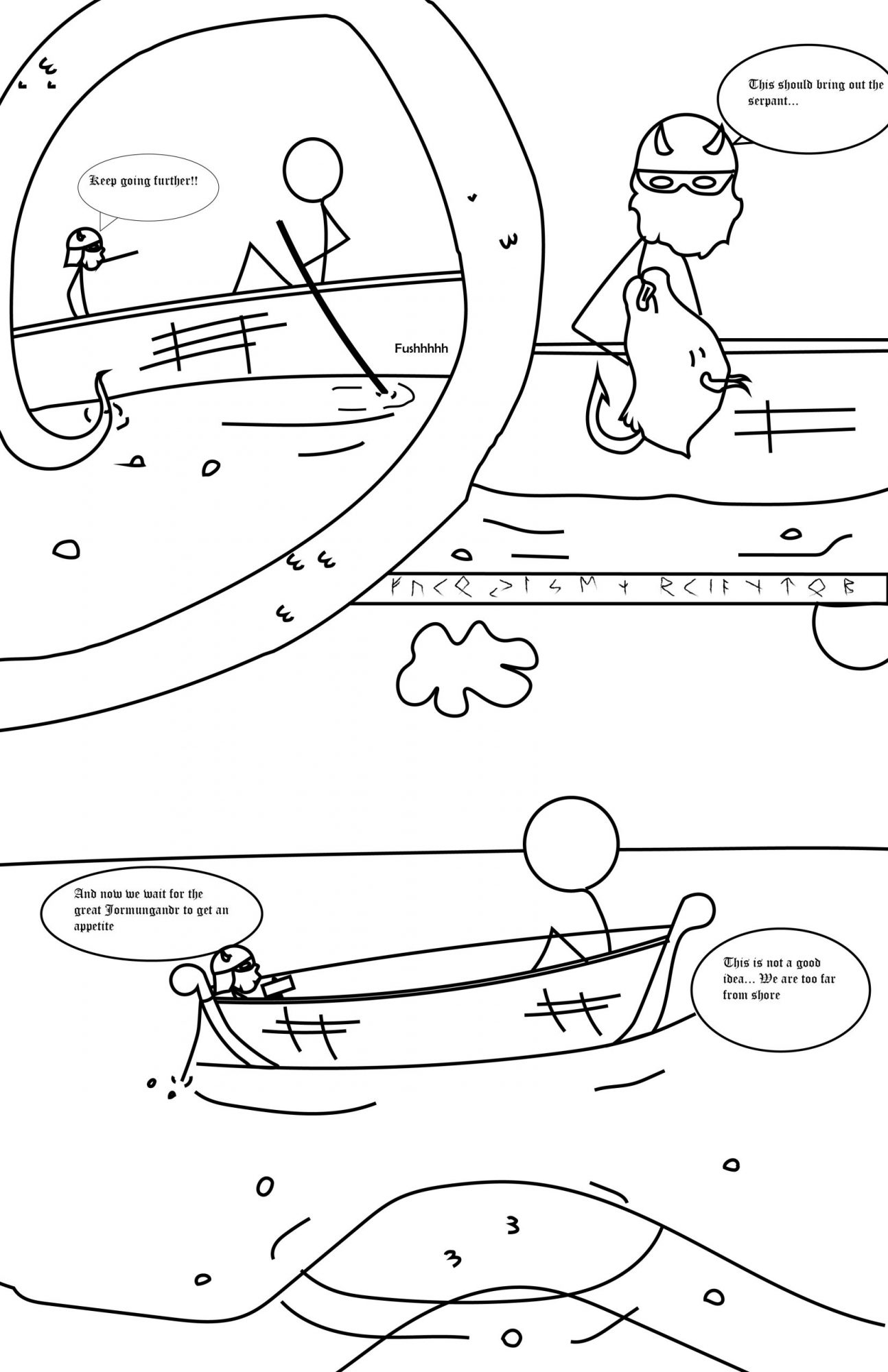
Thor setting bait for Jormungandr (the world serpent).

dimensional as it divides panels and is present and interacting with multiple panels while seemingly being one object not replicated in other panels like other objects such as Thor and the giant. This also plays into emphasizing the size of Jormungandr and eludes to how he may encircle the world in a more abstract way than literally how the mythological stories describe him. Regardless of the confusion that may occur by the obstruction of gutters it still reads left to right, top to bottom. The comic panels generally follow the subject to subject closure method as the scene and idea remains the same it just switches to different times and actions to fulfill the idea of setting the bait. I chose the font style to seem more transcript like. In the top left panel I used the word “Fushh” to indicate that the boat is moving. This also plays into the passage of time. I also believe the way Jormungandr is present in the panels at different times in while still being one, un-replicated, entity is inventive.

This was my first time using illustrator. Everything was new for me and thats also why I resorted to stick figures as my characters as they are easy to draw out. i just went into more detail for Thor’s helmet and beard. I still prefer drawing by hand as I feel it is much faster. I used Iconography in almost everything. The characters are stick figures which obviously represents people, the slashes on the boat represent the texture of boards used for the construction of the boat, the bump like thinks on Jormungandr’s skin is there to represent the texture of scales. Selection, Copy, and paste where the most useful as I thought it was pretty quick for replicating lines and then just slightly changing them.
Posted in Fall 2019 Archive (201 Blog), Uncategorized | Leave a comment

Final Poster Comic: Kristine Zorn

Final Poster Comic created by Kristine Zorn in October 2019

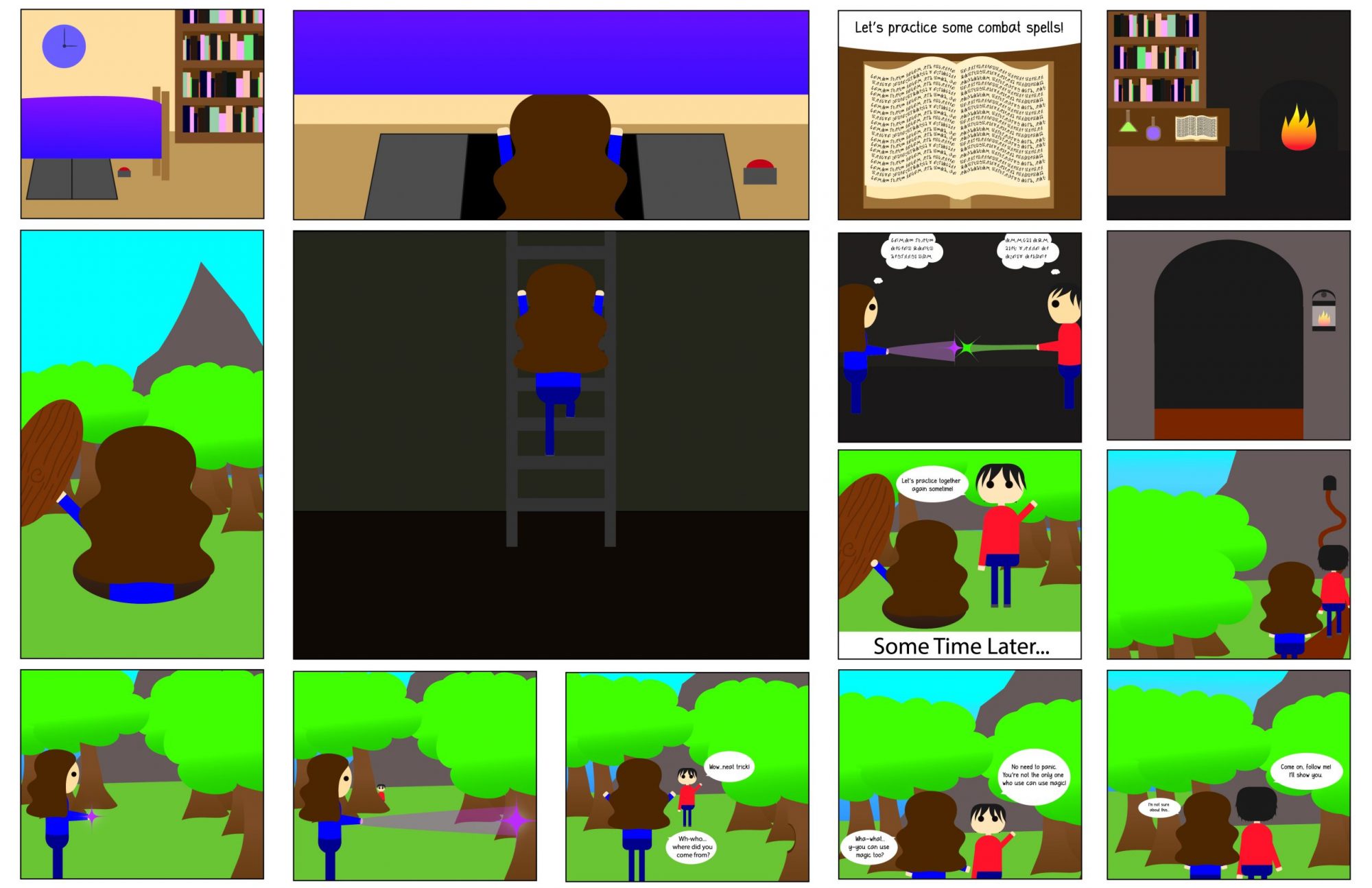
My creative process started with a story idea that I came up with a long time ago but never put down to paper. I picked a scene from my story and just started sketching. My first rough sketch started out with 20 frames. After I went back and though more about how to challenge the reader’s expectations I combined some frames and ended up with 15 frames. My comic challenges normal expectations because after reading the first two panels normally the story moves downward one panel and then to the left. Then the whole bottom row is read left-to-right and then the story moves upward, to the right once and down a few panels before you end up back at the tunnel panel. The first time you read the first three panels the girl is climbing down into the passageway but the second time you come across them she is climbing back out of the passage and into her bedroom.

Close up of Final Poster Comic created by Kristine Zorn in October 2019

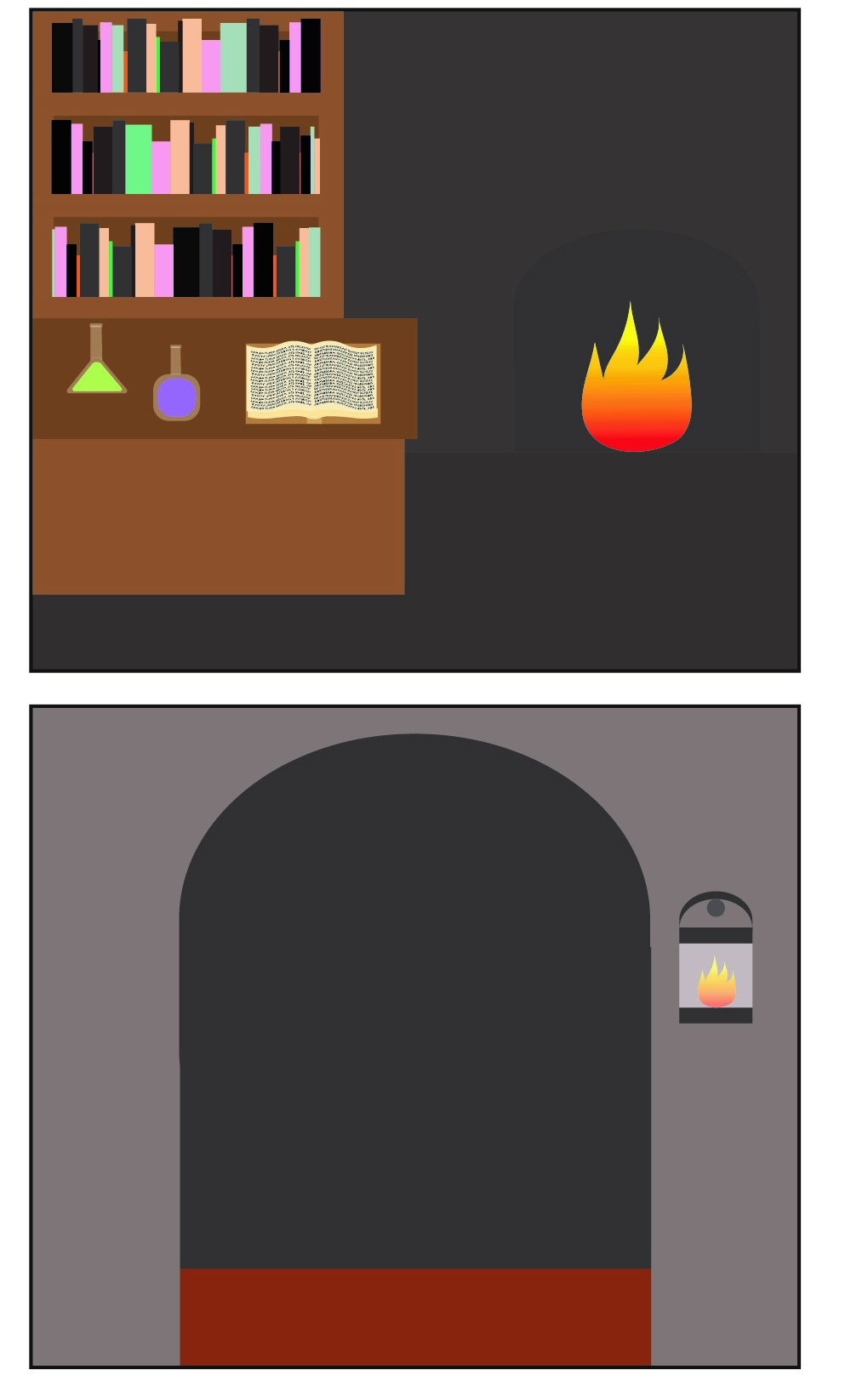
I would say most of my comic is action-to-action closure. The girl opens a trap door under her bed and then climbs down a ladder into a tunnel and in the next panel climbs out of the tunnel, etc.. Panels follow her character step by step. I think an argument could be made that the two panels in the top right corner are aspect to aspect where it shows the outside of the cave and then inside. It is possible that someone could interpret no time has passed in between these frames.  However, I intended there to be a small passage of time between these frames, showing that the characters have reached the door to the cave and then entered the cave in the next frame so I probably wouldn’t consider the two frames to truly be aspect-to-aspect.


Close up of Final Poster Comic created by Kristine Zorn in October 2019

I think the frame showing the close-up of the book is interdependent. Without the text, it would be impossible to know they are looking at combat spells since the book in the image is written in a fictional alphabet. Without the image, it isn’t clear that they are looking at a book written in some strange, magical language. The frame where the guy is saying not to panic is a word-specific panel. Most of the importance is in what the characters are saying and the picture is just there to illustrate them talking.

I think my strategy was inventive because of how the comic starts and ends. The girl goes on this adventure to the forest to practice magic, meets a stranger who is also able to use magic, and practices with him. In the end, though, she ends up in the same place she started and the comic started her bedroom. The beginning is the end and the end is the beginning.

This was my very first time using Illustrator. I have dealt with vectors a little bit before using the shapes tools and line tools in Photoshop so I knew a minuscule amount about how to use the curvature tool. However, it was still difficult to get used to vectors. I found myself frustrated more than once when I realized there were ideas I had that couldn’t be executed in Illustrator the same way they could be in Photoshop.

I don’t know exactly what kind of style I would call the iconography. It was based on an art style I started using a few years ago which was originally based on the “chibi” style and then simplified. “Chibi” is something like a very cutesy, simplified version of the anime/manga style. After simplifying the “chibi” style even more it has lost most of its resemblance to anime/manga at all. It is definitely a more abstracted style with oversized, blob-shaped heads and black circles for eyes. It is so abstracted the characters don’t even have mouths or noses.

All of the art that I do in my free time for fun uses linework. My lines always have varying line weights and tapered edges. The lines are important for adding character to the artwork. I couldn’t get that same effect in Illustrator. Even though you can change the width of the stroke so you can have different sized lines throughout the artwork each line itself doesn’t have any varying line weight. To get varied lines like I usually used each line would have had to have actually been a closed shaped rather than just a line. Creating the lines as shapes like that I found was time-consuming and wasn’t very practical. my favorite tool I learned about in the tutorials was the text on a path tool. It came in handy when I was trying to create the magic text on the book where the pages were wavy rather than flat.


Posted in Fall 2019 Archive (201 Blog) | Leave a comment

Final Poster Comic: Dane Graves

When it came to the creative plan for my comic I started with making a layout and then trying to think of what I wanted to put in it. I didn’t want all my panels to be squares so I started with angled panels that fit together which went through multiple variations. To challenge the direction of how readers read panels fit into this as well, the first three panels reading direction is left to up right then down. The slanted panels have the space in between adjusted to be wider that the top panel to nudge readers towards that desired reading direction, after that however the next four panels can be read in any direction. Clockwise or counter clockwise the reader will read each of those 4 panels in any direction they want before moving down to the panel at the very bottom that is centered. Closure from each one of my panels is mostly subject to subject and scene to scene. The first three panels are subject to subject as the reader needs to read between the lines to find meaning while the scenes staying in a scene or idea. Scene to scene applies to the four panels that can be read in any order as they travel an unknown amount of time and distance. I used linguistic mode to establish a small amount of dialogue, and to infer to the setting and time without actually straight up telling the reader. Under Scott McCloud’s definitions the dialogue is mostly picture specific or additive, as I believe the reader can figure out whats going on without the dialogue, the dialogue is merely “soundtrack” or helping. This was my first time using illustrator in somewhere between 4 and 5 years. I used illustrator for the first time in a web design class in my freshman high school year. I never mastered the program and barely learned basic tools. This time around I learned more tools, and more quickly with the better understanding built on digital tools in general and on past knowledge like already understanding what vector graphics are. For Iconography I used pumpkins, nighttime, and going door to door to let the reader understand it’s Halloween without actually saying that it is Halloween. I also used a bunch of references to Horror movies in each of the 4 any-direction panels, that could be viewed as icons of there referenced movies. Clipping masks were helpful for some panels and layers and grouping were great for specifying what I wanted to move and use. I also used some effects to get things like lighting and the like looking better. I just wish I had better art skills in general so I could do perspective more properly.
Posted in Uncategorized | Leave a comment

Final Poster Comic: Cierra Haken

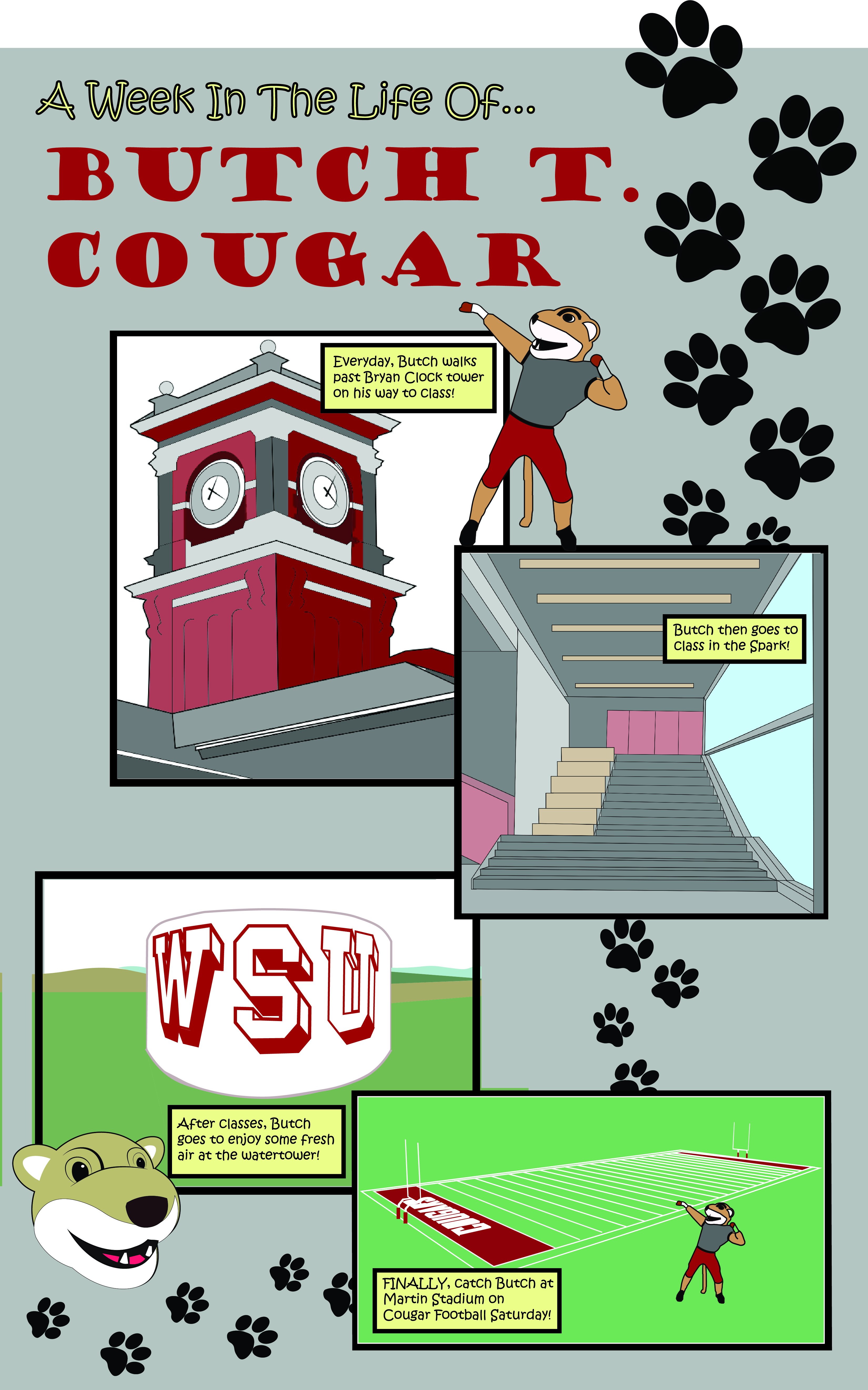
A Week in the Life of Butch

When I began to think about my Comic poster for project two, I did not know the kind of story I wanted to tell, but I knew the layout I wanted to use. I chose to have 4 panels in my layout all offset and each one overlapping another. I also wanted to have some character or aspects from my comic breaking out into the gutters to add variety. I chose to write about Butch T. Cougar because he is a very well-liked character on the WSU campus. To add the effect of time to my comic, I designed a week in the life of butch, as I would imagine it. Each panel is a different scene of Butch’s week, including walking past Bryan Clock tower, going to class in the Spark, going to the WSU water tower, and of course, at Martin Stadium for Cougar Football Saturday. I chose to do this in this order because I wanted my viewer to visualize Butch walking around campus in places that we as students know so well. This creates a scene-to-scene type of closure to my comic because as my viewers see Butch going through the average day of a WSU student, I hoped that they will visualize each ‘scene’ in their days and imagine Butch doing what they do, because that is what the viewer can relate to in my comic.

The text I put into my comic was a simple narration of what and where Butch is going on campus and in Pullman. This text-image relationship would be additive because the text explains what Butch is doing well but the images of the buildings and the character of Butch really adds to the story and shows the places that Butch sees, as well as gives the viewer a reminder of what each place looks like if they do not know or cannot remember.

This was not my first-time using Adobe Illustrator. I used it a lot in my Design Communication class at the beginning of this semester, creating a lot of pen drawings of buildings and interiors. From this project, I learned how to use the painting tool, as before, I would usually place my drawing into Photoshop to color in. I worked mostly with the pen tool to create my detailed buildings. I tried to make each panel look as realistic as I could because each image is so specific to WSU and I wanted to portray it well. Also, when I created the Butch character, I based them on the actual mascot, because he is already cartoon-

ish as is. I think the style I chose works well because each aspect in my poster blends together well and is very recognizable and relatable to the viewer.

Posted in Fall 2019 Archive (201 Blog) | Leave a comment

Final Poster Comic: Arron Borja

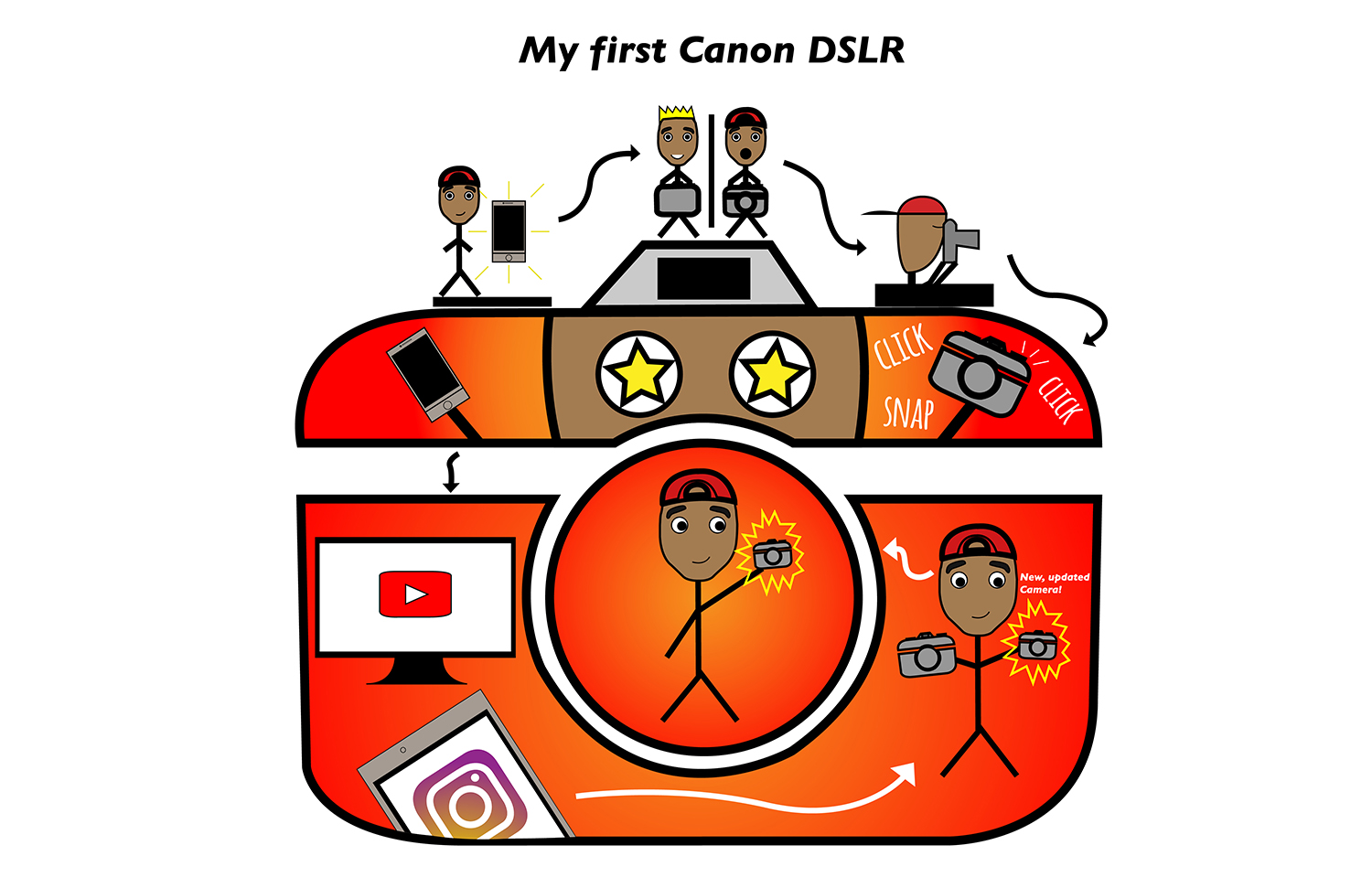
For my comic, my creative plan was to tell the story of the first time I got a DSLR. Specifically a Canon DSLR because it’s my favorite camera company. While coming up with the design, I wanted to be as creative as I could while not being too extra and adding too many elements where things could look chaotic. I wanted to focus on telling a story over style. My comic lives in and around a camera. It starts with the reader’s normal left-to-right expectations. However, there are a couple of times where I feel like the reader would be confused with the order (which is why I included arrows that guide the reader) like towards the end where the second to the last frame is all the way towards the right and the last frame is in the middle of the camera on the lens. I think that regarding closure, by seeing that I outlined the new camera that I got, the reader can come to the conclusion that it is an important object to me and that it holds great significance to me. I used the linguistic mode in my comic, but very few. I provided a title to my comic, used onomatopoeias, and a little note as to what the outlined camera exactly was. Regarding the passage of time, I would say that from the beginning of my comic to the end, it’s obvious that time has passed because I was only using my phone for photos and video, but then I was introduced to my first DSLR in which I played around with and eventually I was able to obtain a newer, updated camera. I think that the reader can tell that a lot of time has passed throughout my journey of creating media through photos and videos.


This is not my first time using Illustrator, I’ve been using it for about a year now. I did learn how to make clipping masks, however. I actually used clipping masks to mask out areas of the phone in the lower left-hand part of the camera outline that was sticking out. In terms of iconography, I used lines and outlines to help display significance to my phone and camera. To help back up the onomatopoeias of ‘click’ and ‘snap’, I had three lines coming from the shutter button. To help make the reader feel that the new camera was highly significant to me, I outlined it with yellow. To me, yellow is a happy color and I chose it to try to back up the idea that the camera is important and me being happy about it. For me, the most important tools were the pen tool and using clipping masks. The pen tool was able to let me make original shapes and the clipping mask was able to let me hide parts of the phone that I didn’t want in the lower left-hand corner. I would say that I was not confused throughout the process of making my comic in Illustrator. This was a fun project. I really enjoyed the process of making it as well as the end product!

Posted in Fall 2019 Archive (201 Blog) | Leave a comment

Final Poster Comic: Brayden Jacobs

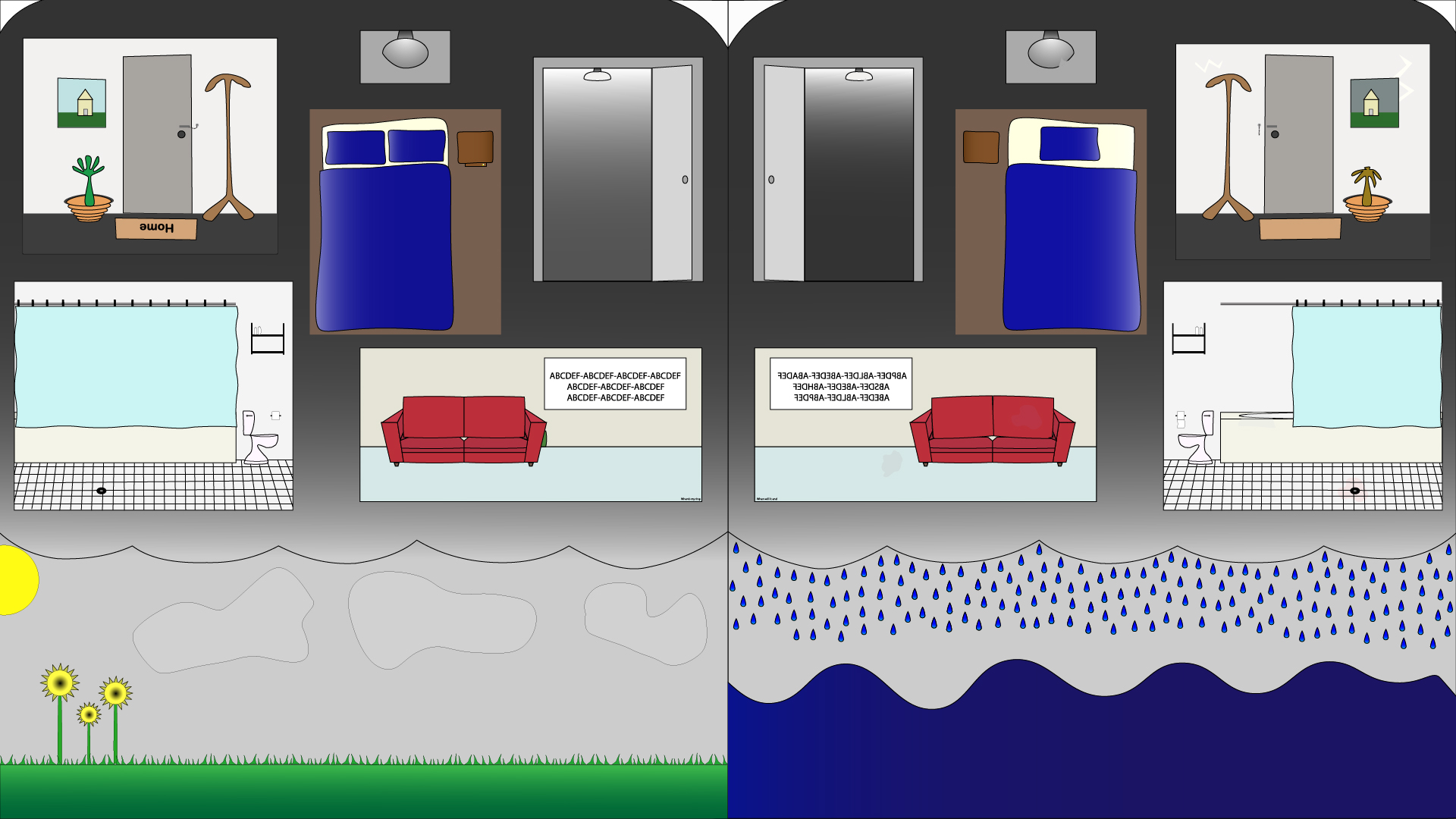
My initial plan for Project #2 was to create a two frame comic depicting two individuals being interrogated regarding a crime they each witnessed. Each frame was going to be similarly structured with a thought/speech bubble drawing the reader’s attention up to the main focus of the comic. Each item/scene the witness’ described was going to be a frame within the frame; a flashback to the event that was focused on a single topic.. I wanted to take advantage of the unreliability of memories and have differences appear in how the two individuals witnessed the crime scene. Words were not going to be used as I wanted the comic to be taken in as a whole scene and words could distract the viewer’s eyes and give a sense of a shorter time period.

Brayden Jacobs Project #2 – The Voice Inside

I had never used Illustrator before, apart from the tutorials, and once I started I had a wave of nostalgia that brought back the days of click and scroll games from the early-mid 2000s. Many of these, such as “Escape the…” type games, had the player overlook every detail of the art and attempt to figure out the story line and use items to unlock more areas to explore. I took this inspiration to create a story of this person, whom is specifically not included in the artwork to allow viewer relations, and the two possibilities of their struggle through depression. The left frame shows two pillows indicating they have someone in their life who can be there for them and make sure they get through each day the best they can. The right frame however only has a single pillow and is much messier and neglected. Even so, neither frame has a sense of total control nor happiness. The sky in the left frame is still grey even though the sun is shining.

Closure, or the space and time between frames, is intermingled throughout the art as the reader experiences both frames at the same time. I avoided using narrative linguistics so the reader can make their own decisions on where their eyes want to go and where they story begins. I left a lot up to interpretation and my meaning behind the work may not be what the reader interprets. Maybe they see the difference between frames to be when a relationship was together and the aftermath of a breakup. The reader may see a widow fall into depression after the loss of a partner. I really wanted to make this poster open to interpretation but maintain an obvious meaning.

Illustrator, as great of a program it may be, was a completely new experience for me. Its limitations compared to pixel based graphics was one of the reasons I changed the artwork’s topic. A crime scene has sounds, smells, and heavy visuals that, in my mind, cannot be portrayed easily with vector graphics. If I had a few months to work on the project then perhaps I could create what I had originally envisioned. I decided on an iconography similar to what I had experienced in my younger years as previously mentioned. Straight lines are boring and being able to add a small curve allows for a much more relaxed image. I used the Anchor Point Tool a lot to achieve this affect and kept the iconography constant. One aspect of Illustrator I could not for the life of me figure out was how to combine lines and shapes together without losing their respective layers. To combat this, I would lock anything I wasn’t working on and keep every object within its respective layer group/folder and was able to move things around smoothly with that instead. The project was overall a blast and I loved getting to know how to use Illustrator at least a little bit. I think it may be a better tool for informational posters and the like, but trying out artwork on this platform was definitely an experience.

Posted in Fall 2019 Archive (201 Blog) | Leave a comment

Final Poster Comic: Peter Dowell

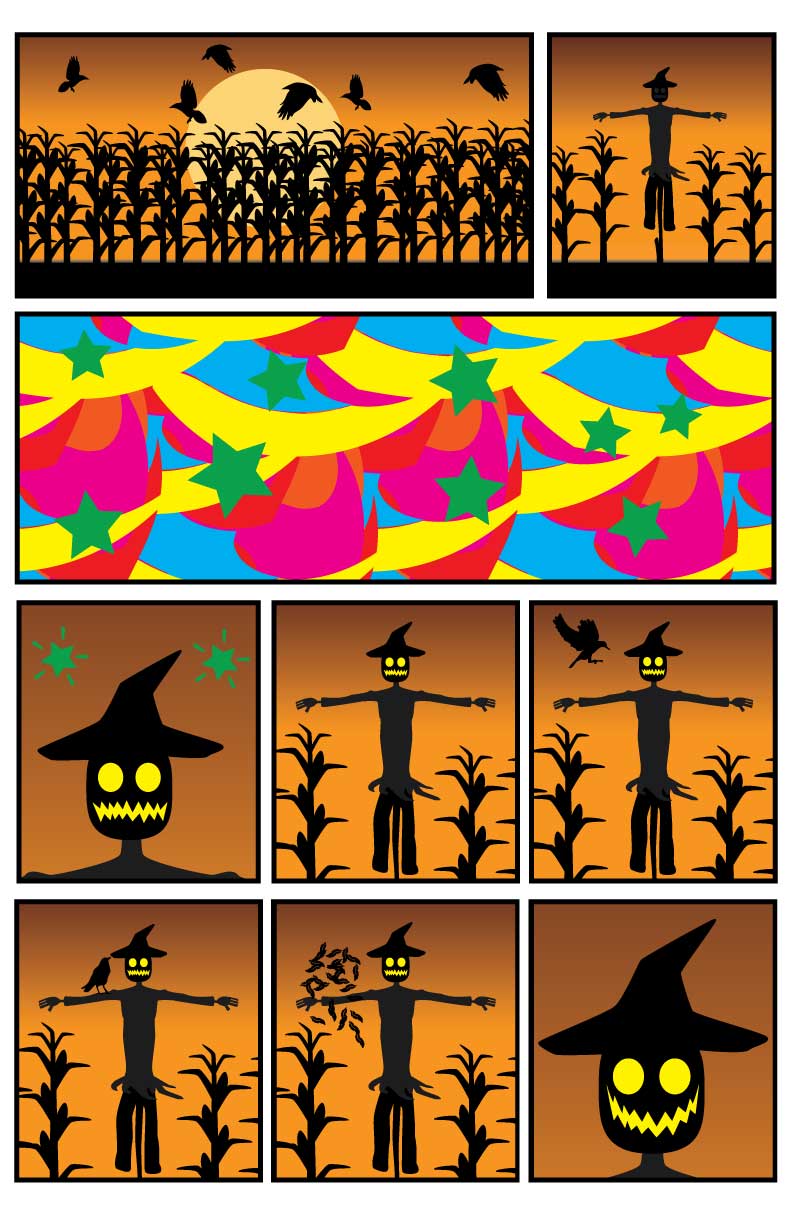
Halloween Poster Comic by Peter Dowell

The creative process that I took when I made this comic was to sketch it out first and then make the images in illustrator. I saw that the date that the project was due was Halloween so I wanted to do something that was Halloween related. I first sketched out my comic and I knew that I wanted to include a frame in the comic that represented the gaining of sentience. There isn’t really anything that can visually represent sentience , so I had to figure out a way to do that. I decided to add make the layout somewhat normal to what a standard comic would have by reading left to right and then going down, but when they go down to the third panel of the comic that is what is representing the gaining of sentience. I chose to just make a crazy pattern with colors and stars and make the panel as the first two combined.  The long panel interrupts the aspect to aspect and it puts the span makes it hard to tell about time. Is the gaining of sentience something that happens in an instant or does it happen over a span of a couple minutes, hours or days? That was the representation I was going for when I made this. Something crazy that interrupts the flow of the comic and the flow of the scarecrow. The scarecrow is the one gaining sentience and I show that by having his eyes and mouth light up and the two stars that are the same as the previous panel. After the interruption it goes to an action to action where the crow comes to land, lands and then there is a cloud of feathers where the crow was into the scarecrow smiling. I am sort of hinting the closure of the scene because after the crow turns to feathers the scarecrow smiles. What happens to the crow between the two panels where it is there and where it is feathers is unknown, but whatever happened to it made the scarecrow smile.

This was my first time illustrating in illustrator, but this was not the first time that I had used vectors to sketch. I took an engineering class that used Solidworks and that used vector based graphics. But illustrator is still very different from that. The iconography that I used for this was the representation of sentience. I made a bunch of rectangles that were different colors and I warped them in a twirl and then I made a pattern with that. The thing that is very interesting is that this is wacky and psychedelic and random. The randomness of this represents a very strange thing that happened such as a scarecrow gaining sentience because it is very random, but interesting. I thought that using the patterns from illustrator helped make the iconography very random just like something gaining sentience. I used the clipping mask for each and every panel which was very nice. I was able to take the image and manipulate it so it could still be seen from the same background to add some consistency with the scarecrow’s background and the crow as well. I also created my own brush for the feathers and the pen tool for all of the sketches that I had to make. I also really like the gradient background with the sun going down in the background along with the colors, it is very visually appealing.

Posted in Fall 2019 Archive (201 Blog) | Leave a comment

Final Poster Comic: Janet Okeago


OKEAGO-JANET-PROJECT-02-01

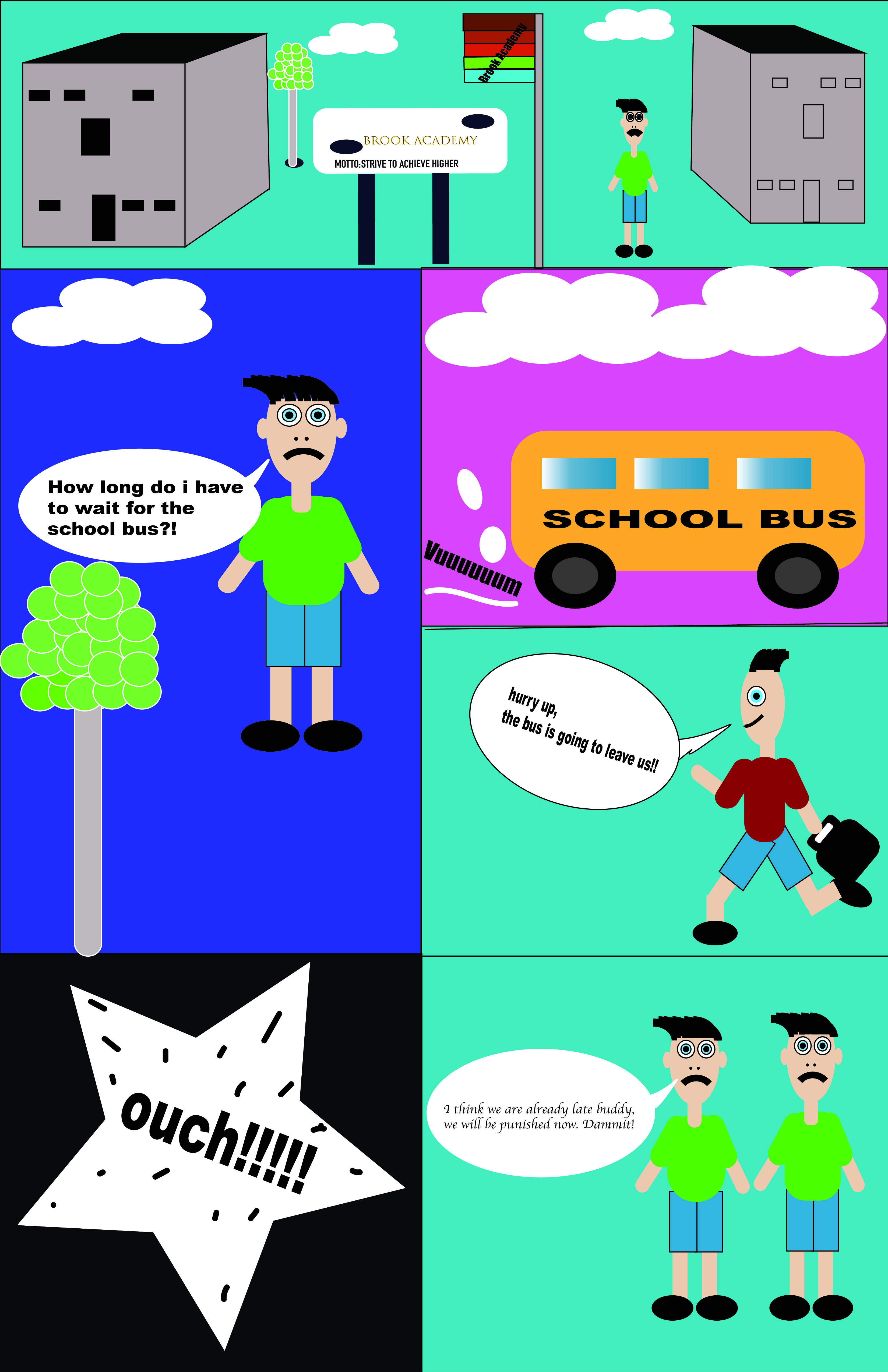
Final comic BROOK ACADEMY SCHOOL, Art by Janet Okeago ,10/30/2019

My plan for creating my own comic was to be in a position to tell a story and to enable my reader to understand how it flow and where to start from. The creative part was being able to use the shapes on illustrator to come up with funny characters that kids also could excited to read and colors. I wanted also to get my readers attention by using different tools and colors. My story included how our kids go to school and dress up in a school uniform every morning and at times they are late and they are afraid that they will punished. I also wanted to gain the experience using illustrator.

Being a first user in illustrator, it was somehow challenging since i was not sure what to begin with and i wanted it to be perfect. I realized you cant be perfect in everything. i was so stressed up and i didn’t want to make a mistake while using it. Forming the shapes and drawings by use of hand was the easiest thing for me and here came a challenging part which i have never used before in my life. I was able to talk to my friends who encouraged me how easy it was and after using the tools for each part i was really excited having learnt something new. I worked for 3hrs in just drawing the shapes which was time consuming and figuring out what to add to make it appealing was also hectic. I really enjoyed every part of making the shapes since some were funny that i had to make more of them to get used to using illustrator. My comic story tells a time where kids leave for school in the morning and we can see the use of texts and their facial expressions to go on and tell us about their disappointment for being late.

Using gradient where i was able to chose two colors was fun and also i used lines to divide the sections for my work which was easier to form. The shapes were great in that i used all the shapes including the rectangle, circles etc. I was able to use the selection tool this time round and being able to group them at the same time, arrange them at the back and front to make them look as one. One can also see the different colors used which are my favorite and i believe they look awesome. The tutorials were useful except for a beginner like me was most challenging to understand them, the shape tool tutorials were clear and easy to elaborate them on the technical part.

Posted in Fall 2019 Archive (201 Blog) | Leave a comment

Final Poster Comic: Jack Kay

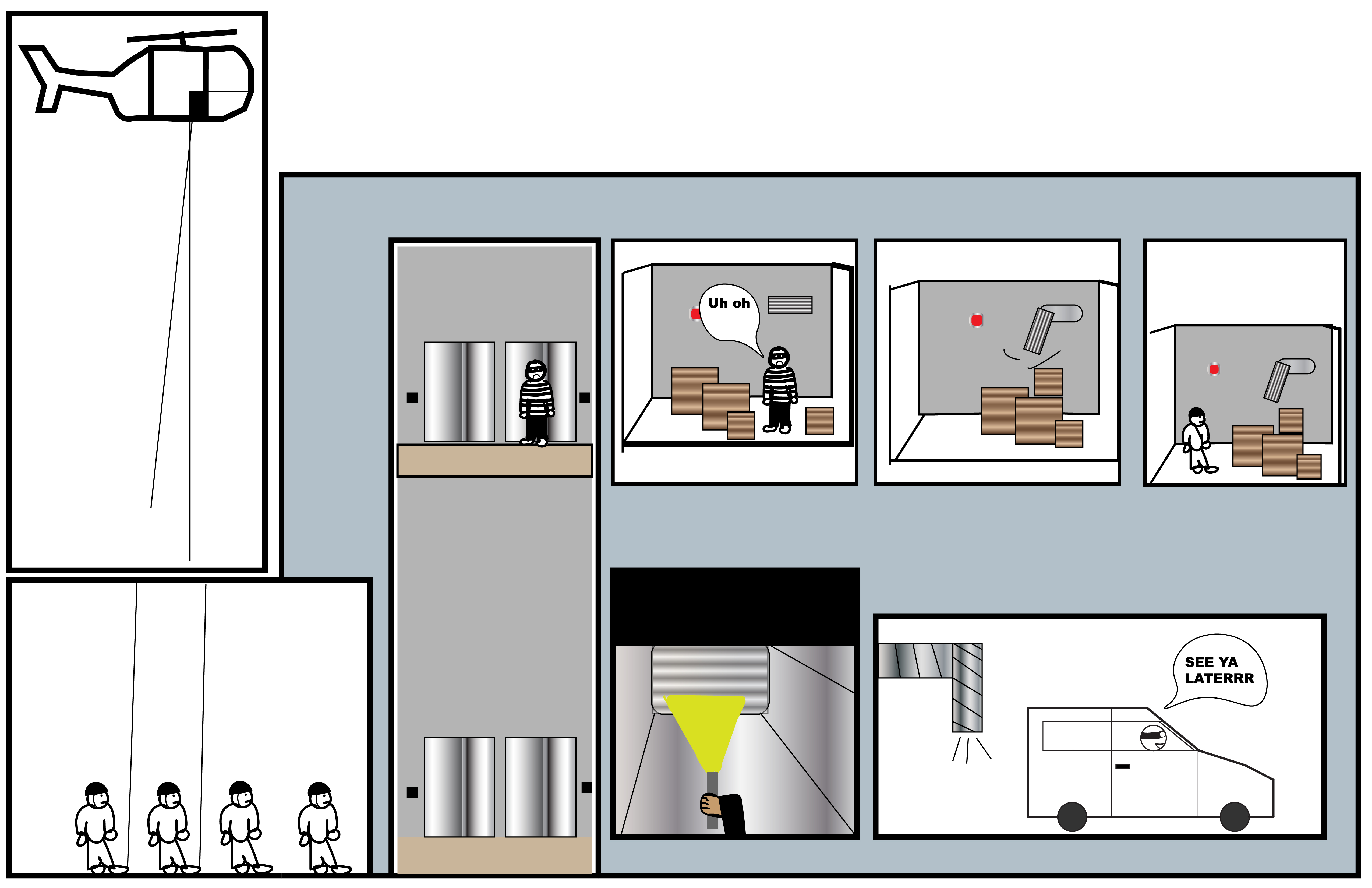
Comic created by Jack Kay

With a wide array of options on how to create my comic, the first idea that came to my mind was doing a cops and robber scene. I love chase scenes in movies so I tried to create a scene in which a robber was getting chases through a building and eventually escapes.  After the elevator scene the story was supposed to lead to the right, to a room in which the robber was cornered. The robber then opened the vent and snuck away from the swat team. Then the reader sees that the crook is in the vents as the swat team is searching the room. In the final scene the crook gets away unlike most stories where the good guys always win.

This comic challenges the reader because the direction is not just left to right, it goes in many directions. The actual scenes are located in a building and the building is a different color than the rest of the comic. The direction of the comic is easily tracked because of the scenes being placed in a time based order. In the room with the boxes, the boxes are moved to help the robber get out and also the vent is swung open; so the reader would most likely easily read from left to right. The comic displayed a scene-to-scene type of closure when displaying how the robber got out of the room. Displaying time was hard to show off because I did not include really any time of day. There is though, a sense of urgency because the swat are dropped off by helicopter and are led on a goose chase for the robber.

This was my very first time using editor and it was really fun to play around with on my own time. Once I organized my layers, the comic went a lot smoother. The thicker lines helped organize the story and helped create the building and what was inside. The colors I used were also really fun to play around with and really created a cool environment inside the building. Keeping shapes as one and moving them around was the most useful for me; after creating the characters, I selected all of them and were able to copy exact replicas and paste more guys around the scenes. This was a fun assignment and a great way to step inside the adobe illustrator application.

Posted in Fall 2019 Archive (201 Blog) | Leave a comment

Final Poster Comic: Eddie Abellar

My poster comic for project two, Fall 2019.

For my poster comic, I created four panels. The first two panels were rectangles of the same size that were transformed to have diagonal lines. These panels help me to create moment-to-moment closure in my poster comic because it shows the same setting during a short period of time. These two panels can be read from left to right. The next two panels I created for my poster comic are positioned to the right of the first two panels, one above the other, and can be read from top to bottom.

In three of the four panels, the passage of time is represented by the clocks in each of those panels. Also, in two of the panels, there are lines that represent movement where the student picks up his homework, and the student running to get to class, which also represents the passage of time. The text I used in my poster comic represents the students inner voice, which is why the texts are placed in yellow text boxes instead of the traditional speech bubble.

This was not my first time using Illustrator, but I would still call myself a beginner with this program since this poster comic was only the second project I’ve made using Illustrator. Almost all of the things I created for my poster comic were made using the rectangle tool, ellipses tool, and the rounded rectangle tool. I used the pen tool to create the cloud in the third panel, the students shirt in the third and fourth panel, and the students pants and shoes in the fourth panel.

Learning how to use the eraser tool and scissor tool were essential for editing my poster comic. The direct selection tool was also a vital tool that helped me create the vision I had for my poster comic. I also found that the arrange button in the properties panel made it easier to organize my poster comic and structure it just the way I wanted.

Posted in Fall 2019 Archive (201 Blog) | Leave a comment