Final Poster Comic: Ruby Pitts-Cranston

Final Poster Comic by Ruby Pitts-Cranston

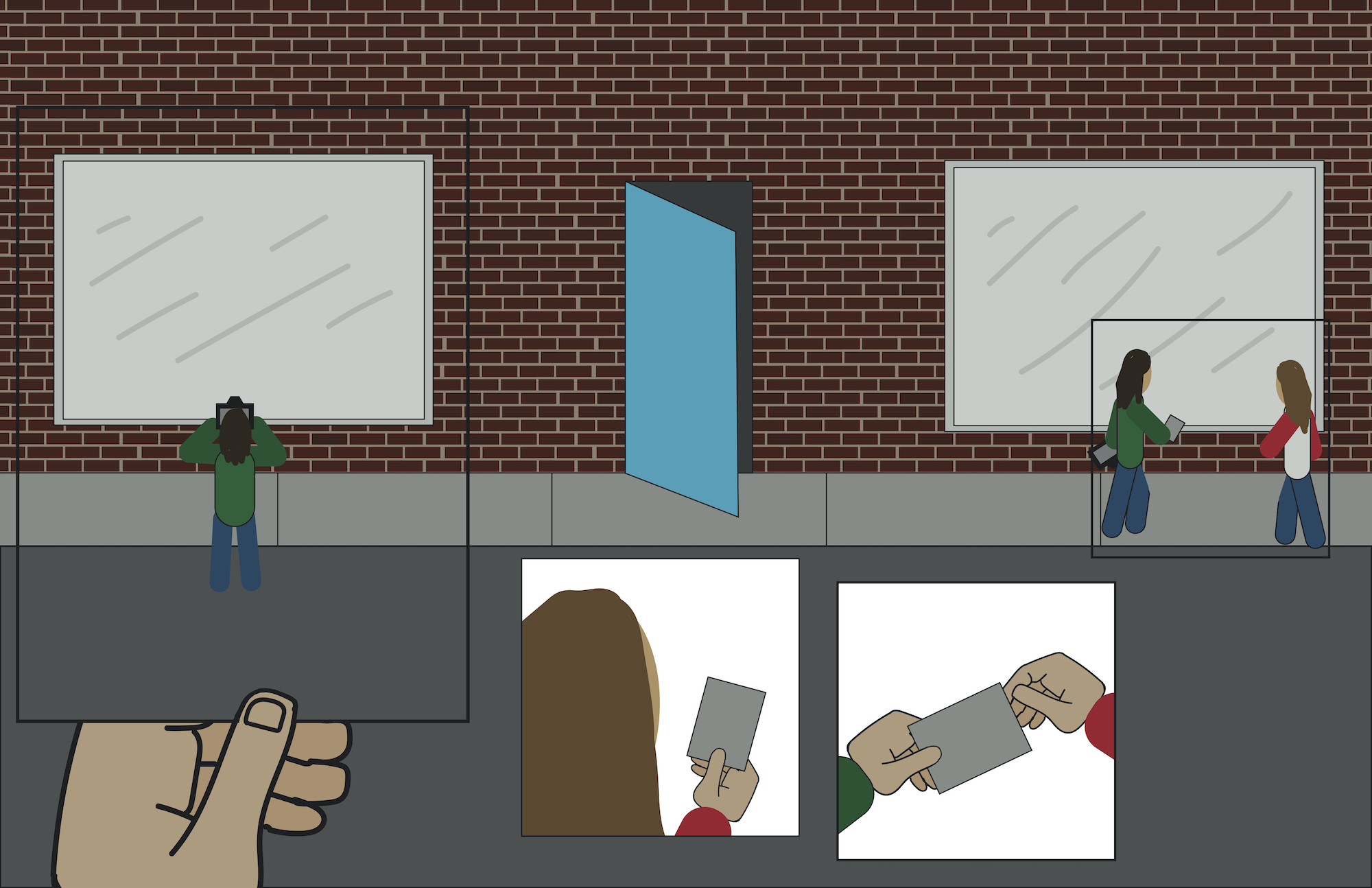
For my poster comic I show a scene taking place in front of a building. The timeline of the comic moves in a circle, so you could look anywhere in the comic and you’ll be able to follow along. The general storyline though is of a person taking a picture, they then give the picture to another person nearby, and when that person holds the photo up it shows the original person taking the picture. I chose this because I wanted to have frames in the comic that sort of showed two different things happening at the same time. I like the way that I showed passage of time because I feel that its still fairly easy to understand, but isn’t the same order that we read most things in. There are four frames in the comic besides the background. The type of closure that I used was action to action for the most part, the whole scene sort of overlaps but the frames themselves are in an action to action sequence, where each thing happens right after the other in a loop. I didn’t use any text or dialogue in the comic because I didn’t feel like it was needed. I was originally going to put the word cafe above the door of the building though. This was my first time using illustrator and I found it fairly difficult. Im very used to photoshop so it was confusing to use a program that looked so visually similar, and had many of the same tools, but was completely different. There were a couple of small things that I missed too when using illustrator, but realized that I had messed up on one I printed. For example a couple of the frames have different sized outlines, and on the lower middle Frame the persons hair is two slightly different colors (I’m still not sure how that happened). There were also a lot of things that I am normally able to do in photoshop but wasn’t able to do in illustrator, and the tools were a bit more confusing for me in comparison. For example I wanted to be able to merge shapes onto a single layer but I wasn’t able to easily do that. Some of these limitations made it difficult for me to make the comic look the way that I wanted to, and that affected the methods I used and the overall look of the final version. I would have liked to have better looking people in the comic, but a lot of the tools were difficult for me so I ended up using fairly basic shapes to make things. I think the most useful tool for me was the live paint tool. This allowed me to draw shapes and then fill them in with a solid color. The shapes were fairly limited so this gave me the ability to make the hands and the peoples hair. I found this project to be more difficult than the photoshop collage because of my lack of experience, but I still had fun and learned the basics if illustrator.
Posted in Fall 2019 Archive (201 Blog) | Leave a comment

Final Poster Comic: Justin Pardini

Final Poster Comic

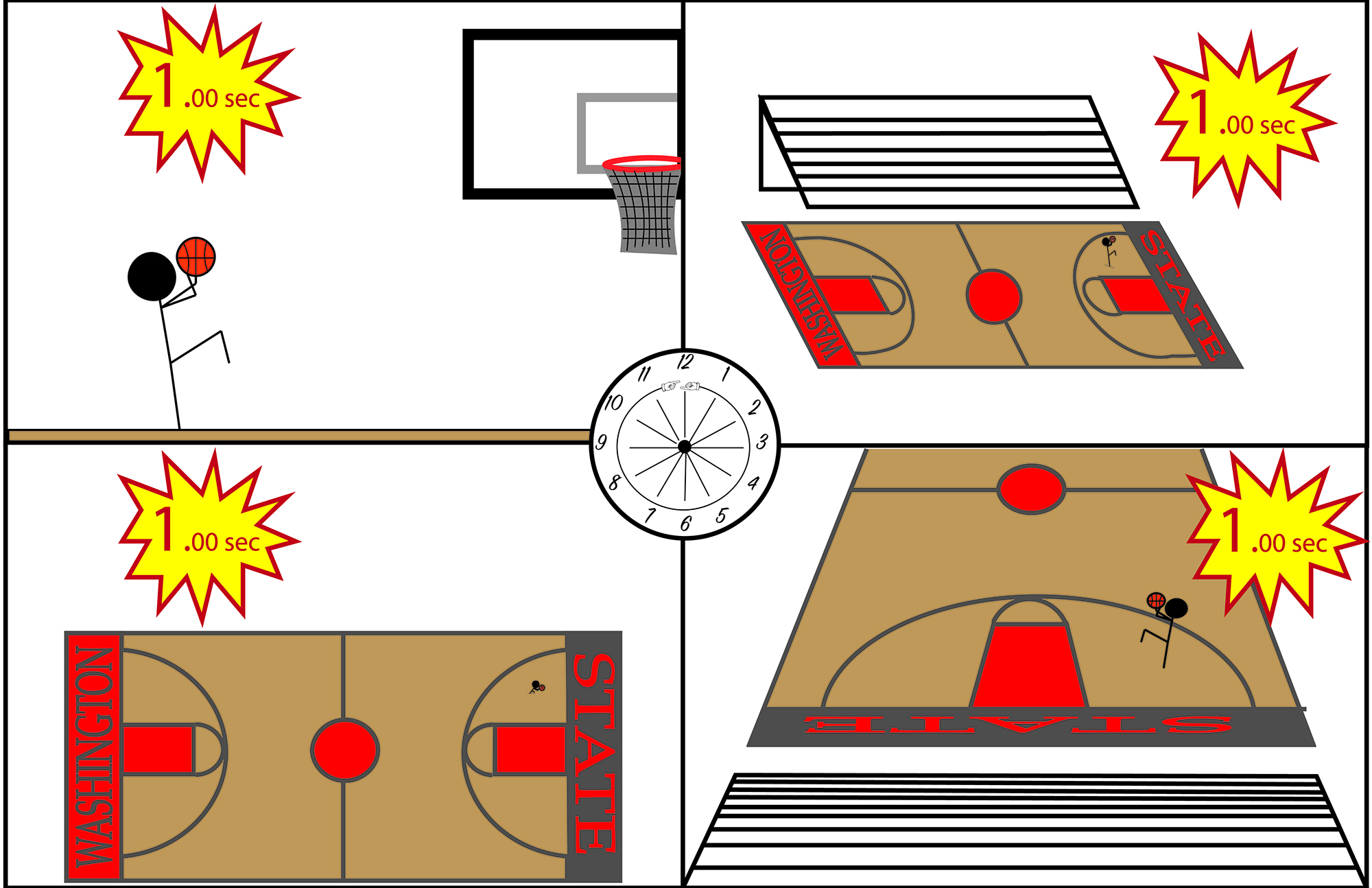
For my comic, I wanted to convey an action scene, but in each frame, I wanted no time to have passed. I wanted to show a moment in time, relayed at 4 different viewpoints that all have different suggestions with it. I chose to include a clock in the center with hands pointed at every hour symbolizing time has stopped or that this scene can be at any hour of any-day, or every hour of everyday, if it continues to be still. Although there are 4 distinct panels, no matter which panel one chooses to focus on, no time will have passed from the panel prior. A typical reader might still read this comic left to right, however, they would realize the lack of time throughout this comic, making it a depiction of one single moment in a scene. I think my comic conveys closure by allowing the reader to view it as a whole, rather than frame-to-frame. Because of the different perspectives, it makes one view it as one whole image, rather than 4 separate ones. I used the linguistic mode to show the amount of time left on the shot clock. I did this to reinforce the fact that no time is passing, for once someone sees the time is the same in every frame, they will be able to decipher the one single moment. I thought this strategy was cool because basketball is such a fast paced and quick game, that not many people are able to stop for one moment and look into the different perspectives. This comic allows one to see viewpoints, including court-side, of something like a game winner with one second left.

Fortunately, this is not my first experience with Illustrator. I was introduced to this program in my Editing and Publishing class this semester, and have been able to practice with help from my instructor. This slight experience helped me with this project because I was already aware of most of the functions and tools, and the abilities they obtain. As for my comic, I tried to make most things simple, yet still give off realistic and artistic qualities. I chose to use stick figures to have this simplistic effect, however, with the court design I tried to make it look more realistic. I think this allowed the reader to focus more on the surroundings and the setting, rather than the main character. I also used bright colors for the more urgent and important parts of the comic to make it easier for the reader to see. I think creating outlines with text was the most useful because it allowed me the change the degree of text and place it in different spots that I was not aware of previously. Ultimately, the tutorials provided assurance that I was on the right track, while still informing me on some things that were unknown to me before, and turned out to be greatly beneficial.

Posted in Fall 2019 Archive (201 Blog) | Leave a comment

Final Poster Comic: Jon Klaveano

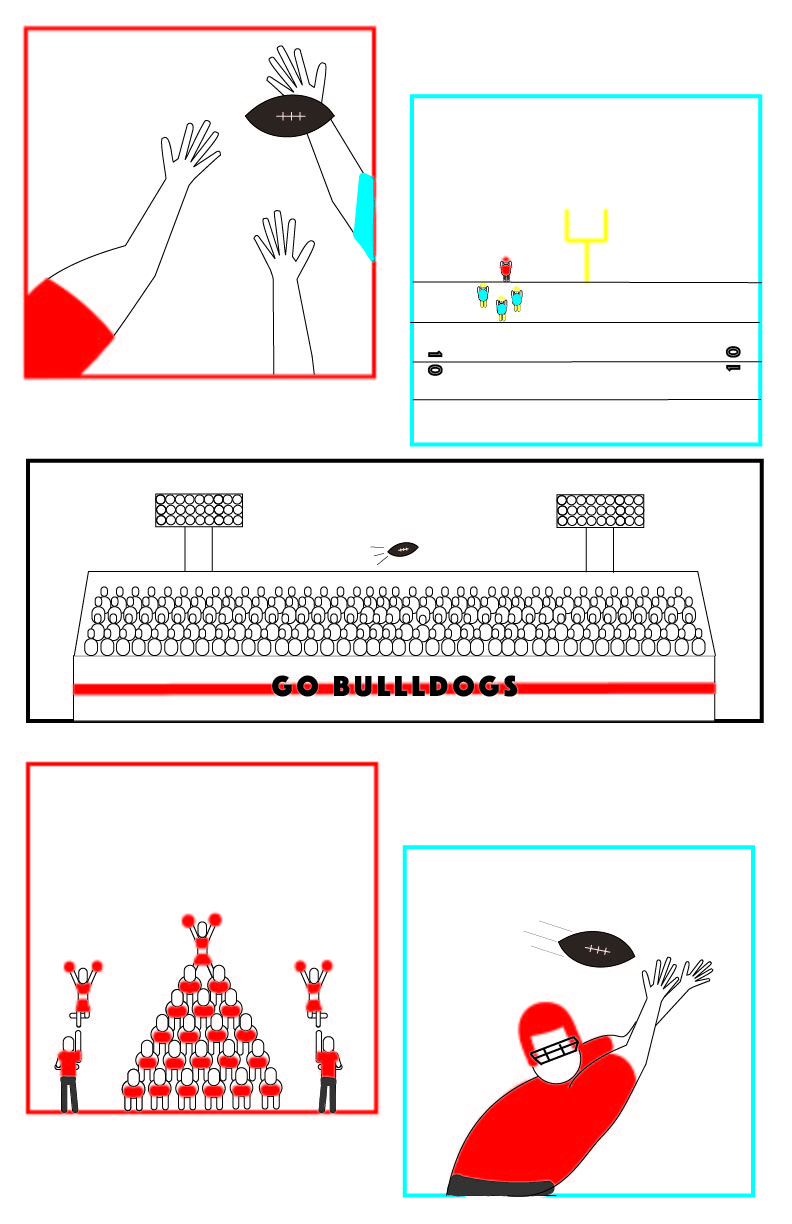
First I had to decide what I wanted my comic strip to be about. I accounted for the fact that our comic strips were supposed to challenge readers normal left-to-right/ top-to-bottom. I thought alot about what would fit this challenge. I thought alot about it and the

Created by Jon Klaveano for DTC 201

fact is action is the best way that I believe to challenge a readers traditional reading style. That being said I then choose to pick a topic that is very action packed and I came up with “Football.” I choose to offset the the comic frames as too inhibit a person’s natural reading style. I also focused on using the actual football itself as a tool to make the time between frames seem obscure. Three of my five frames include the football traveling. I think the traveling of the football is what guides the viewer through my comic strip. My comic features two styles of closure: Action to Action and Aspect to Aspect.  The Action to Action is represented by the football traveling and the players attempting to receive it.  You can tell multiple people are in pursuit of the ball. I think it is important that I left it up to the viewer to decide who is on offense and who is on defense because it changes the story either ways. The Aspect to Aspect is represented by  the frame of the players, the frame including the crowd, and the frame including the cheerleaders. I believe that my comic strip does a great job of having an obscure timeline. You could look at my comic diagonally and it would still make sense. I think that the football driving the timeline is what sets my comic apart. Additionally, my comic doesn’t feature who threw the ball which makes it possible for the viewer to interpret it in many different ways. I have use the Illustrator software once before in Com 210. That is the extent of my experience with the software. The tutorials taught me alot. Most importantly though it taught me how to organize my work in the illustrator software. The iconography I used varies from somewhat realistic to bubble people.  I did this to express that my frames were either up close or far away. I think that viewers will pick up on this because only two of my frames feature somewhat realistic figures. Whereas the other three feature bubble people. I would also say that viewers will interpret my iconography as being very organized and precise. I think my limited experience with adobe illustrator was my only limitation when it came to this project. I found myself using the anchor point tool and the arch tool to create the shapes and figures I wanted. I also used the layers panel extensively alongside the properties panel when it came to my figures, color splotches, and shapes. Creating the figures was quite challenging.

Posted in Fall 2019 Archive (201 Blog) | Leave a comment

Final Poster Comic: Erika Epperson

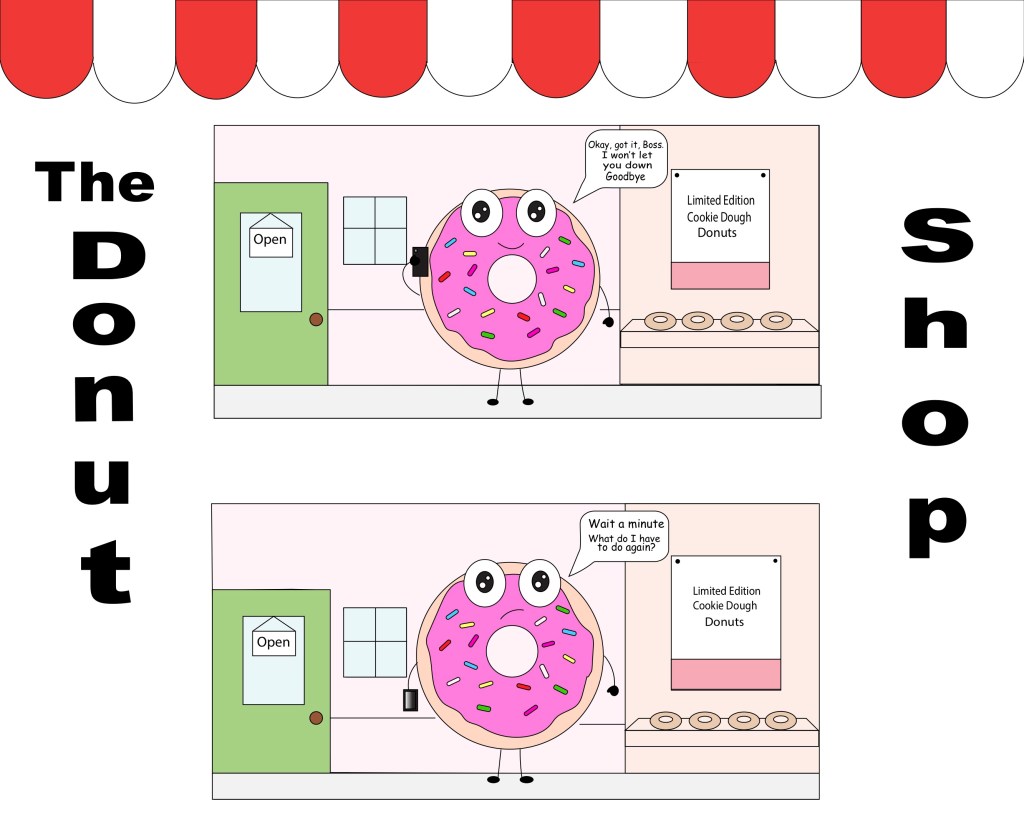
My creative plan was to do something lighthearted and simple looking. I decided to make my frames top to bottom and left to right because it would be easier to read and I felt like the simple layout worked well with my design. I put two boxes on top of each other because I wanted the layout to seem like a picture of a building as well as a comic. The type of closure that my comic had was action to action. In McClouds words, it is transitions featuring a single subject. In one moment you see the donut holding the phone, and in the next you see the phone down. Linguistic was a big part of this comic. Even though the title is “The Donut Shop” if you look at the backdrop it can be hard to figure out where the place may be, despite the donuts on the shelf. I put a poster advertising donuts to make sure the audience knew that it was a donut shop. I also added the open and close sign on the door as well, to make sure the location of the backdrop was clear. You can also see that the donut is on the phone with his boss. If there was no linguistic you would not know who he is on the phone with and why his face expression is changed.

Since this was my first time using Illustrator, I didn’t know what I was doing at all in the beginning, Although I slowly started to understand the tools better, there were a couple road blocks that I have encountered, but was able to figure it out eventually through Illustrator tutorials. I chose clean cut shapes to show the simplicity in the comic. I also chose to make a donut character because donuts are round and it shows the bubbliness of the comic as well. Even at the top you can see the roundness to the roof and also to a series of other objects, as well. Surprisingly I didn’t really have any limitations, even though it took time I was able to manage to make it look the way I wanted it to look. Though I will say if I had more time I would have maybe put some more details than I already have, although I have put some details  already, like the camera lens to the phone. The most useful tools while working on this project was the shape tools, pen tool, curvature tool, and the type tool. I used those tools a lot especially the shape tool through my whole process.

Posted in Fall 2019 Archive (201 Blog) | Leave a comment

Final Poster Comic: Joseph Alonso

Created by Joseph Alonso. October 2019.

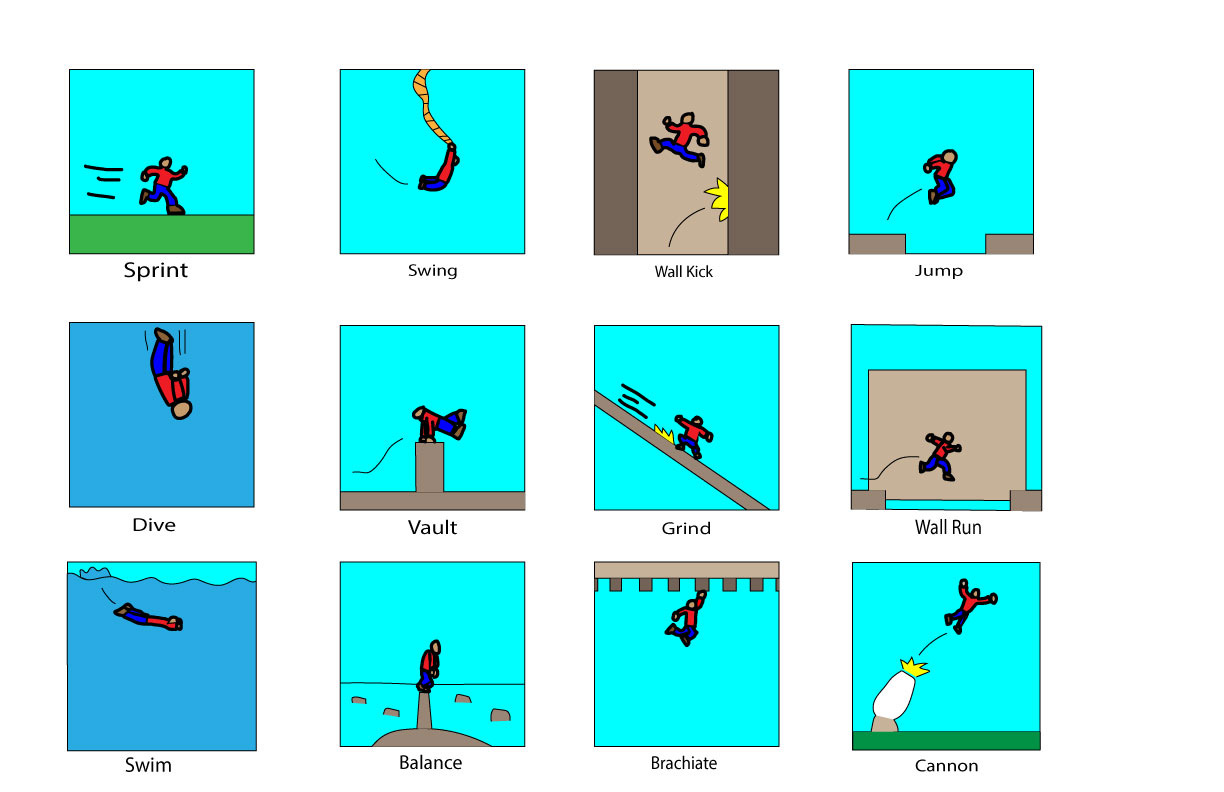
My comic, which I have dubbed “Frames Of Motion,” challenges reader’s perception by allowing them to read each panel in any order they want.  There is no one true way to read this comic, because they are scattered images of different kinds of motion that I enjoy in video games.  From running, to grinding, and even firing yourself out of a cannon, these are all things that make movement fun in platforming games.  However, two panels that could be seen as being read one after another in sequential order are the “Dive” and “Swim” panels, due to the coloring, and the placement looking like the man is diving into water.  The words describing the motion are not entirely necessary, as the images are self explanatory, however, the “Wall Run” and “Brachiate” panels are interesting to me because brachiating is the term for monkeys swinging through trees, and the “Wall Run” panel Ould just be seen as another variation of jumping without the description.

This is my first time using Illustrator, and I found the experience to be rather informative. Learning a new method of drawing aside, I learned that vector graphics allow you to fix small errors in your brushstroke that you would have to completely erase and redraw otherwise.  The only problem I had with Illustrator was coloring in the shapes.  I had to redraw certain lines to make use of the tool that fills in what is inside of the lines.  It makes me miss the simple fill tool from MS Paint.  One type of iconography that I used were the yellow spikes shapes.  When placed in front of the cannon, it turns into an explosion.  Placed on a wall with the man moving away from it, it turns into a splash of action to point out his kicking off the wall.  When placed on the rail behind the man, it turns into sparks that are generated from grinding on the rail.  The shape of spikes are able to be used for many different things, much like straight or curved lines displaying various directions of movement, which I also used.  Overall, I had fun making this poster, and I feel like it can give people a little more insight on my likes.

Posted in Fall 2019 Archive (201 Blog) | Leave a comment

Final Poster Comic: Mareenah Galang

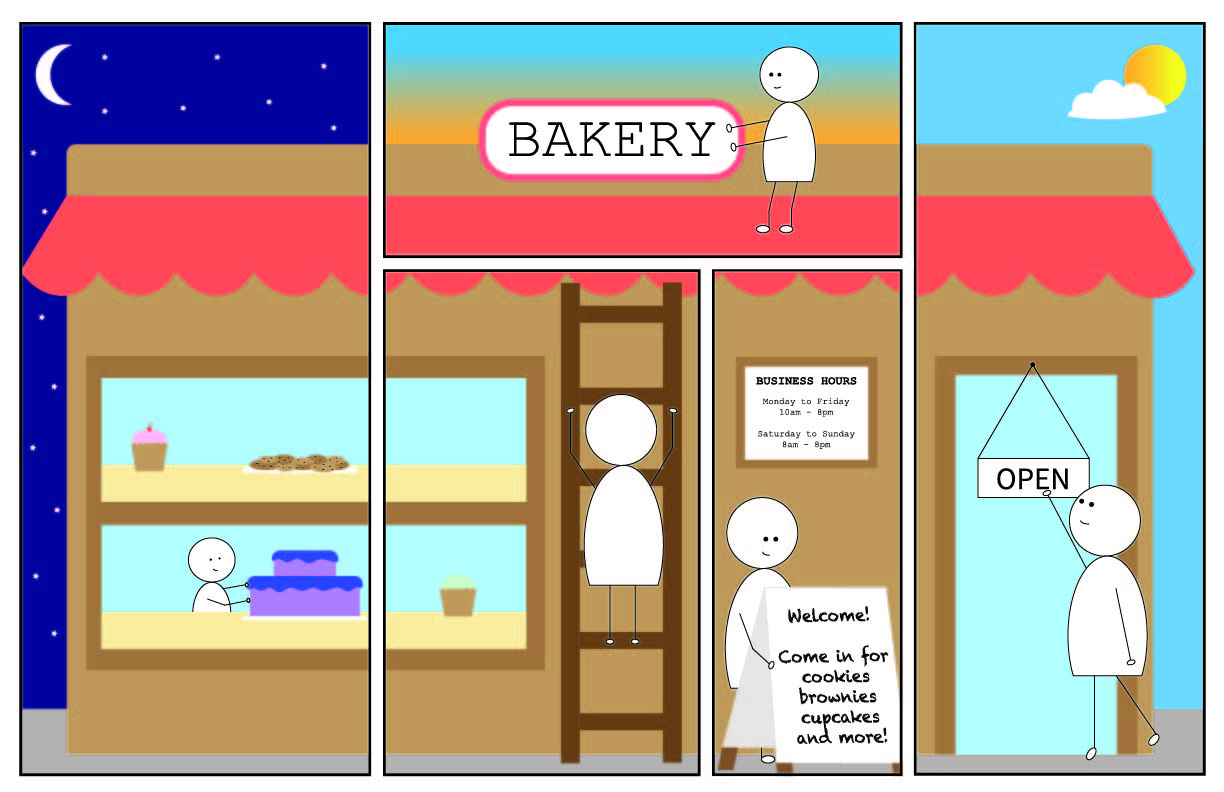
I really wanted to create a comic that showed the transition from night to day. The idea that I came up with was someone getting ready to open up their business (a bakery) for the day, starting from the break of dawn to the daytime.

My Poster Comic

My comic has a layout that guides the viewer’s eyes both up and down and left to right, as opposed to just left to right like the typical comic. The viewer first sees the left-most panel, where the character is putting a cake on the window display. The window display then continues into the next panel, which then makes the viewer look to that panel. In that same panel, the character is climbing up a ladder that presumably leads to the roof of the bakery. The viewer’s gaze will follow where that ladder leads to, which is going up as the next panel is on top of the previous panel. In this next panel, the character is fixing the sign. In the next two panels after that, it shows the character finally getting ready to open the store and start the day, with the character setting out the sandwich board and flipping over the open sign.

I did use a bit of text in my comic, although not for dialogue or action words. I typed the business hours, welcome sign, and open sign to show that the character was about to open the bakery. I think this further shows the passage of time.

My comic describes the passage of it time due to the sky changing colors in the background, as time goes on. In in the left side of my comic, I showed that it was nighttime by adding a dark blue sky, stars, and the moon. In the middle portion of the comic, I used a gradient to create a sunrise effect. On the right side, there is a bright blue sky with a sun and cloud, representing daytime. In addition, the actions that the character does is in a chronological order and shows the passage of time, starting from getting the window display ready, to finally opening up the bakery.

I did have a little bit of experience with Illustrator after using it in a different class. However, I was not well versed on the variety of tools that Illustrator contains. After reading and watching the different tutorials, I felt like I acquired a lot more skills that I could use to create my poster comic. One of the things that I learned from the tutorial was using the pathfinder effects to experiment with different shapes.

For my iconography, I chose to use pretty simple shapes and muted colors. I wanted a calm feeling that matches the mood of a bakery.

Like I said earlier, I learned about the pathfinder effects from the tutorials, which really came in handy when it came to my comic. I used the “minus front” pathfinder effect to create the crescent moon, as well as to create the body of my character. I also used the shear tool a lot to make certain objects more slanted.

Posted in Fall 2019 Archive (201 Blog) | Leave a comment

Final Poster Comic: Emily Bartholomew/

This is my final comic project.

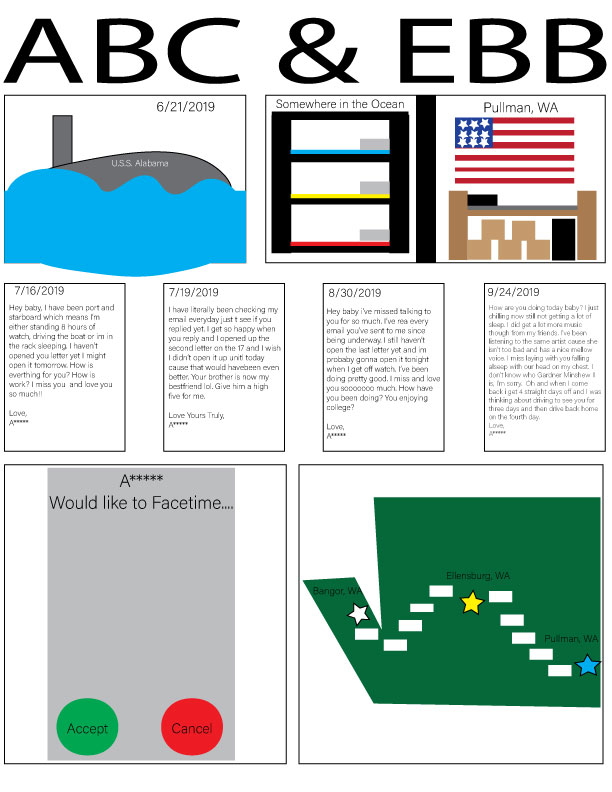
For my Final Comic poster, I decided to do it based on a real-life experience that I am currently going through. I thought it would be a good idea to make a comic on my relationship with my boyfriend that’s in the United States Navy. Everything that I put in my comic poster actually happened. I tried to not use words on my poster because I feel like its kind of a waste of space in comics. The only part that I really used in the comic poster was the little email letters that I typed out from the original message. I took parts and pieces of the original email that was sent to me and left some parts of the message out. There were many other email messages that I could have used but there was a part when he was gone that he couldn’t email me back so that’s why it jumped to another month. But other than the email letters that I use the only words that I used where cities in Washington that we both live in and the one where we met up at. The story of the comic poster is that he’s somewhere in the ocean on a Submarine and I’m at school in Pullman, WA. The only form of communication that we can use is email. Then the next day after I got the last email, he faces timed me and that meant that he was back home safe and sound, after his 3-month trip in the ocean. The last frame in the comic poster is a map of Washington and little white dashes ending up at Ellensburg, Washington where is the halfway point for both of us and met up there.

I had a hard time when it came to Illustrator. I messed up on the size of the poster, I accidentally had the poster set to 11pt x 12pt instead of 11 inches x 12inches. So when I tried to print my poster the first time it was really small on the paper so I had to redo the whole poster on a regular-sized piece of paper, but then I realized that it was still too small so I had to make it bigger with the help of the professor. But besides the size of the poster, the only other part that I had a hard time building was the getting what I had in my head on the computer screen. If I’m being honest the poster did not come out the way I wanted it to. But I tried my best with what I could work with.

Posted in Fall 2019 Archive (201 Blog) | Leave a comment

Final Poster Comic: Zach Morgan

Audible Emotion, my Final Poster Comic

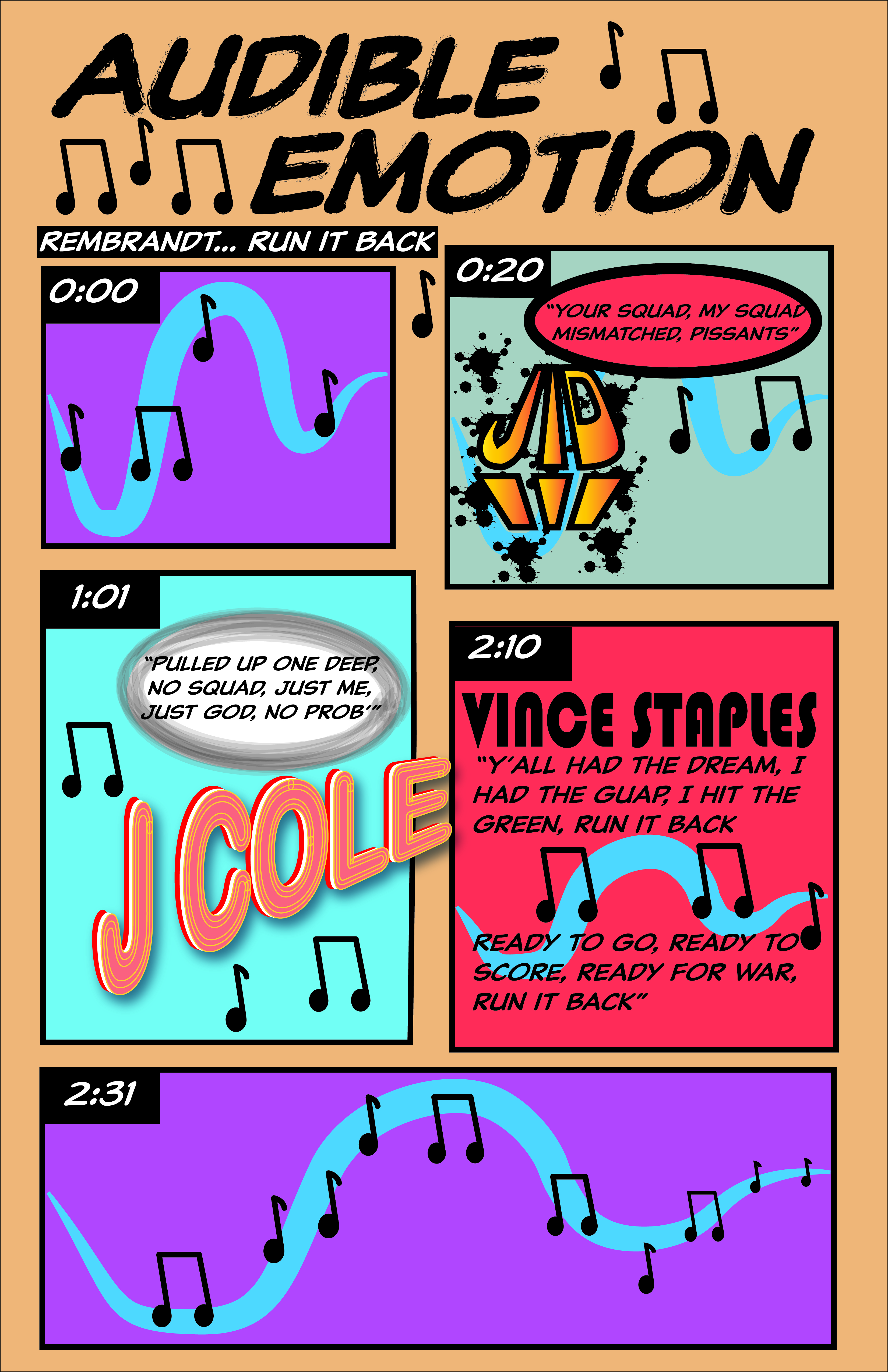
In an effort to create a unique comic, I thought it would be interesting to turn a song into a comic and attempt to convey the emotion of the song to the reader. I decided to break up the song into panels and each panel is a verse by a different artist. As the author of the comic, I undermine a reader’s normal expectations of how and in what order to read each of the panels. With that, I make sure to guide the reader through the comic by indicating what point in the song each of panels take place by using a timestamp. This allows the reader to know exactly where they should be in the song, which then allows the reader to critically think what emotion is trying to be conveyed at a certain point of the song/comic. Similarly, the closure that occurs in this comic seems to be purely emotional. Because this is in the format of a song, I did not add any actual characters to the comic, which means that all of the information is conveyed through words and the pictorial elements. This is an example of a word-specific word-image combination. Between the first two panels, the reader has to decide how long the first panel lasts and what happens in between the end of the first panel and the beginning of the second panel. This is an example of subject-to-subject closure. Overall, my comic describes the passage of time through telling the reader exactly how long each panel should last. This is inventive because it allows the reader to follow along with the song and the comic and be able to stay on track with both.


Creating this project was only the second time I had used Illustrator. Although I feel like I learned most of the features with my first time using it, I felt very comfortable with it and was mostly reminded of things, rather than learning new things. Because this comic is word-heavy, I wanted to really pay attention to the fonts I used. Each font indicates something else. I have my basic font, which is shown in the body text, title and subtitle. Another way that I use lettering is to indicate which artist is currently on the song, so I made a different textual design for each of the artists (J.I.D, J Cole, and Vince Staples). I did feel limited in Illustrator because I had to make all iconography myself and I am not yet very experienced in the program. I think the most useful tutorials were all of the pen tutorials as it allowed me to make a cool logo for J.I.D.


Posted in Fall 2019 Archive (201 Blog), Uncategorized | Leave a comment

Final Poster Comic: Keanna Maki

Becoming A Butterfly By Keanna Maki

This project was a good balance between being both difficult and enjoyable for me. One of the biggest challenges I faced was finding an idea that I wanted to do for this project because all of it was pretty much based on how you personally wanted to create it in the end. I really struggled to figure out ideas that would fit. There was so much flexibility and possibilities that this project allowed me to work with. The only struggle I faced was not being proficient in Illustrator. In the beginning of my creative plan for this project, I focused a lot on the Illustrator tutorial videos to help me figure out the basics of the program and what I could do for this comic. In this comic, it is centered on a caterpillar who is seeking a home to fulfill its transformation into a butterfly. I have designed illustrations of the caterpillar’s journey to get there.

One of the big tasks in this project was to communicate the passage of time. I accomplished this in my project by displaying the background from nighttime to daytime at certain points. It is brief and short, but I think it captures the passing of time. I even have leaves that have changed colors to encourage the shift in time. My comic challenges the reader’s normal left-to-right, top-to-bottom expectations by totally doing the exact opposite of that. In fact, I started my comic from the bottom left and ended it at the top right. It took me a lot of thinking to figure out this process. Even now, I look at it and understand the flow of the comic, but it might be too complex, and viewers may find some confusion following along. I figure that if they pay attention to detail, they can see that each frame leads to the next frame, step by step. Viewers may have to access this comic with an open mind when figuring where to go next.

There is definitely closure going on in my comic. More specifically, a good mix between moment-to-moment and action-to-action types of closure. Moment-to-moment fits for this comic because the frames are literally going from moment-to-moment. Especially, in the lower frames, there is more obvious signs of this closure. The caterpillar goes from walking on the ground, then approaches a tree, then starts climbing the tree, they near a branch, etc. I would say there is a little mix of action-to-action because at the ending frames, I portrayed the shift of time which changed the action of what was happening in the setting of the frames. Overall, my comic does describe the passage of time in the simplest ways. I figured that it is common knowledge that caterpillar’s transition in their cocoons over a period, so if that wasn’t known, I made it apparent that time was changing by the background setting of the sky. My strategy is inventive because I took an idea so simple and made into much more.

This is my first-time using Illustrator and I can say that I really enjoyed the process. Once I got into doing the project, I realized the process to create my ideas wasn’t as hard as I thought. Looking back, my biggest challenge was not knowing how to use illustrator, but now, I am at a comfortable point with it than I ever thought I could be. There is much I still need to learn. For the iconography aspect of this comic, I worked a lot with shapes which was my favorite part. I would say using shapes for this project made my task easier. Combining shapes was also something I utilized a lot in this project. Using shapes helped give my comic a more animated look to it. Working with Illustrator and vector graphics helped me increase my creativity and content in my comic. The only limitations I had was not knowing more of the infinite tools I could have used to make this project better. Like I said before, the shape techniques and tools were most useful, and it made my project a lively comic in the end.

Posted in Fall 2019 Archive (201 Blog) | Leave a comment

Final Poster Comic: Hyelim Min

Project 2 Final Poster Comic by Hyelim Min

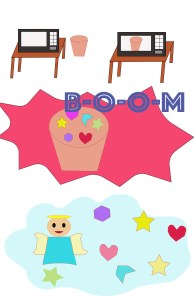
In my opinion, the readers are able to read my poster comic left-to-right and also top-to-bottom expectations. There are the two panels on the top that can read from left to right. And after those panels, the viewer is guided to read the comic by top-to-bottom. The closure in this comic works by the movements that is showing in time to time. When it shows the basic movements occurring, the closure such as movement-to-movement is clearly represented. I used the noise explosion from the microwave, “BOOM” so that the viewers can more easily understand what is happening in the scene. The linguistic mode matches with my panel which illustrates the microwave containing the bowl of happiness turns into the heaven. Overall, my comic describes the passage of time by actions and movements change time to time as the panel goes to the bottom.

It was my first-time using Illustrator program in my life. I learned that it goes different with the Photoshop program that we have used for the first project. While the photoshop is designed to edit photos, the illustrator program is based on depiction of my design based on shapes and lines. I used the iconography that is type of lines and paths because it makes my comic completed in free access in expressing movements and easier to illustrate whichever I want to express. I used pen tool and direct selection tool as most useful techniques while I illustrate this poster comic. I used it to move around the shapes and draw objects in a way that I want to express. Using the pen tool was confusing in the beginning because understanding the anchor points and use it to draw paths and curves was not a job that I was used to it.

Posted in Fall 2019 Archive (201 Blog) | Leave a comment