Menu Design: Joshua Yi

Cupcake Royle 

The menu I chose to highlight it’s design and visual hierarchy is actually a restaurant that I’ve been to, Cupcake Royale.  I think this menu is really successful at using contrast of colors and scale.  Each category of food items are in separate typeface, distinctly separating what types of items they are.  The prices are written in constant color and type throughout the whole menu, which allows the customer to easily pin point out the important information.  The variety and intensity of the colors are very minimal in design where it only uses three colors; black, pink and white throughout the entire menu.  However the placement and the usage of each color is distinct in their usage.  The intensity of the colors also differs. The description is each item is less bold then the items themselves, making it easy for the eyes to follow each category.  The spacing of each items are close to fit the vast array of selections, but done in a manner where it’s not overwhelming.

Paradise Creek Brewery 

This menu on the other hand is more simple in its hierarchy where the placement of each item is under a category that covers a whole page in a list.  Each item differs in their scale, size, and value but follows similar spacing and color.   Unlike my previous menu, the type is larger in design where each category takes the entire space.  I think this level of size is successful in appealing to older customers who might have trouble in reading smaller fonts.  Also, although it lacks color, the style of lettering really makes each dish stand out from each other.  I do however think this menu is really dull.  The lack of color really flattens out the contrast of menu overall.

Posted in Fall 2017 Archive (336), Fall 2017 Archive (336) | Leave a comment

Menu Design: Riley Cagle

Screen Shot 2017-11-07 at 12.49.05 AM

Menu for Joseph’s Pizza in Jacksonville, FL

This menu stands out in a number of different ways towards the menu’s hierarchy. For one, the menu headlines are the first thing that grabs the eye. It’s large size and different, bold font make the menu really stand out, along with the use of color differing from each menu. The bright colors really contrast the white background. Then the logo typeface is another very different font and curved architecture, which makes the title of the restaurant stand out. As the menu goes down, the menu is split into different sub-headers, defining the different themes of meals. Then the menu item goes slightly down in font size, and the description of the menu item goes even further down in size, establishing a strict hierarchy within the menu. The menu is very angular and box-like, creating a very organized style of the menu.

The Paradise Creek menu thrives in many ways, but in my opinion, fails in many too. The menu strives to be different and defies many basic styles. Each piece in the menu differs drastically in size and font style, creating a different visual experience for each menu item. It still catches the eye towards different headlines and sub-headers, but can be straining to read for some. The larger and more wild headers tend to overshadow the smaller and more simplistic styles, possibly causing the readers to skip over sections accidentally. A positive of the menu though, is the fun vibe it puts out due to the wacky style and fonts. This can create a disorganized and style, which differs strongly to the first menu I talked about, which was much more organized and easily navigated. The two menus are very different, but each work in their own way. One is more fun to read and creative, while the first one is more organized and easy to read and navigate.

Posted in Fall 2017 Archive (336), Uncategorized | Leave a comment

Menu Design: Whitney Demarest


I think that this menu, The Faversham from Leeds, UK is both visually intriguing, and well organized. The hierarchy is not only represented in the main menu, but also in the call out pages. The first red call out page uses color to grab your attention, and lists the specials from the menu that the restaurant wants you to pay special attention to. The main menu is split into two columns. The separation of columns, and space used keeps the reader intrigued, and looking at the page for longer. The two columns is a better strategy than listing everything in one long chunk of text. The different sections on the menu have titles like sides, appetizers, and main dishes because this is the hierarchy that a reader would most commonly look for the items in. The menu utilizes a bold sans serif, and a regular sans serif type which emphasizes the clean and modern feel of the menu. The menu uses an ample amount of white space, which makes it more interested to look at, and more “user friendly”.

The Faversham

The Faversham Menu – Leeds, UK

The Faversham Menu – Leeds, UK

Overall, I think that the menu above is more visually pleasing than the menu from Paradise Creek Brewery. The two menus share a similar hierarchy, listing appetizers, burgers, and entrees, which makes it easy to navigate. The font used for the Paradise Creek menu vary’s for almost every item on the menu, and leaves the reader distracted. The type is also a lot larger than the Faversham menu, which cause you to have to flip back and forth from several pages rather than just being able to look at one page. I dont think there is anything successful about the Paradise Creek menu. It is hard to read, and uses white space in a poor way.

Posted in Fall 2017 Archive (336) | Leave a comment

Menu Design: Sophie Stoltman

I choose a menu designed by Re for Bare Witness, in Sydney Australia. I picked this menu because I loved the color contrast and the simplicity of the design with the use of negative space. The designer used contrasting weight, spatial intervals, and scale to enforce hierarchy of the menu. Each dish is put into different categories for appetizers, drinks and major menu entrees. This menu design keeps things simple with all lowercase and the same font. Scale and weight single out the different categories and spatial alignment connects prices to dishes. The universal theme of the menu is said to be clean and simple connecting the name “Bare” and the reflecting the clean ingredients the restaurant uses.

Personally, I prefer the Bare Witness menu to the Paradise Creek one. I think that this menu has too many different fonts, making it hard to identify what is what. For example, the Appetizers label is about the same size as all the appetizer options. The contrasting weight of the Pub Pretzel is confusing. My eyes go straight to that part of the menu. One thing that I liked about this menu is that the descriptions of each item is smaller than the item title. The contrasting size and fonts make it easy to know what description goes with each item.  Another thing I like is the sides section. I think it does a good job of breaking up the page and making new sections of the menu.

Posted in Fall 2017 Archive (336) | Leave a comment

Menu Design: Camille Oppedal

The menu I chose as a good example of visual hierarchy was for the restaurant “Departure” based in Denver, Colorado.

Menu for “Departure” Asian Restaurant in Denver, Colorado designed by Melissa Wehrman. Source

I think this menu exemplifies hierarchy in a number of ways. The overall organization is simple and clean, but also versatile and interesting. Firstly, the most important aspect of the menu is the restaurant’s title, “Departure” which is in all caps and at the top of the left-hand most flap of the menu. The title is tilted a bit as well, which sets it apart visually and makes the presentation visually interesting without being illegible or too over the top. The flaps themselves are an interesting element because they separate the content of the menu into 3 distinct columns without losing the cohesiveness of the menu. The titles of each section denoting the type of food (such as “salad” or “dim sum”) organize the menu items clearly through the use of larger, bolder font that is hanging to the left of the specific dishes listed below. The dishes are all justified within the same line and are then easily read as being equally important, with the prices of each dish justified opposite without too much space to confuse the viewer of which price relates to which dish. I also think the use of the imagery behind the semi-transparent container for the menu items adds visual interest without being too overwhelming to the eyes. Additionally, the color palette is simple, and though it depicts a mountain scene, it appears more as a subtle gradient that compliments the simple menu rather than being the focal piece of the menu.

As far as the Paradise Creek menu, I see quite a few choices that detract from the overall design. I can tell that the designer was attempting an eclectic, quirky style for the restaurant, but I think that the overly ambitious use of various fonts and organization methods just confuses and takes away from the items themselves, as if they need to hide behind extreme fonts because they offer sub-par food. It seems as if every single kind of font has been used in the menu, which is hard for the reader to adjust to and creates the impression that some items are more important than others, with font size varying as well. I like the use of the periods between the names of the dish and the price, but with how items are not justified in a single cohesive way (switching from right to left and centered justified) it makes it even more obvious how uncentered and uneven the grid system is, which was either ignored or not used properly.  I think that the “sides” menu in the middle is also a little distracting since the heavy border attracts the eyes as well, and makes it seem like it is more important than the actual entrees. I also think the “green salads” title being off to the side is another poor decision as it doesn’t match any of the other design choices aesthetically and is difficult to read at such an angle and in that font especially.

Posted in Fall 2017 Archive (336) | Leave a comment

Menu Design: Allison Cissna

http://www.underconsideration.com/artofthemenu/archives/pint_brothers.php

pint_brothers_PHOTO_01For my menu choice I decided to work with the Pint Brothers menu. This menu does a great job at displaying hierarchy which is “the order of importance within a social group or in a body of text” (Lupton/Phillips). They have clear titles that direct you to what you are searching for like; sandwiches, soups and salads and main meals.The Pint Brothers kept their menu to no more than 3 fonts which is more than enough. Customers tend to get overwhelmed when their are too many fonts because they don’t know what to look at anymore. This menu also has a strict grid system which keeps everything clean and organized in order to be easily navigated.

Paradise Creek’s menu does display hierarchy but not as well as the Pint Brothers menu does. Their fonts seem to be all over the place and in a way seem to enjoy fonts a little too much. Paradise Creek does a good job at being clear and concise and sticks to a single grid on the front, but on the back they do a better job with sticking to a grid and make it a more eye appealing layout for their customers. It could definitely improve in the font category and making things look like they truly belong with their company style. I think they are all over the place and make things very confusing to what I’m even doing at that restaurant.

Posted in Fall 2017 Archive (336), Uncategorized | Leave a comment

Book Cover Design: Jessica Colvin

When reading through Chapter 4 of Timothy Samara “Design Elements A Graphic Style Manual” a couple of principles really caught my attention: the range of literal to abstract in images and how that plays into the scale of reality/believability to the symbolic; how words with pictorial qualities transform into super signs that evoke visual, emotional and intellectual qualities that make them memorable; and how metaphor can be used for mental brainwashing because viewers given a series of images or text and an image will automatically create a narrative to connect those things.

Looking through the Book Cover Archive by Ben Pieratt and Eric Jacobsen, I found three book covers that relate to the project I would like to design and also demonstrate the principles taught in the selected reading.
“The Crow’s Vow” uses a literal image of a crow that is highly realistic in a way that makes it into an abstract symbol.  By placing the image of the crow in a line of text it makes a complex statement without complicating the design.  It forces the viewer to fill in the missing word with the picture in a way that I believe captures the ‘super sign’ quality and makes it a highly memorable cover design.

“The Crow’s Vow” by Susan Briscoe, Designed by David Drummond

“Pale Fire” by Vladimir Nabokov, Designed by Stephen Doyle.

“King Arthur in the East Riding” by Simon Armitage, Designed by Samantha Johnson.


The cover of “Pale Fire” is a metaphor that creates a mental narrative for me.  The title and the spent match invite me to create a story out of those two things.  It is thought provoking in that it is not clear what is actually meant by ‘pale’ fire, but when paired with the spent match it makes you think that smoke could be ‘pale fire’ or perhaps the fire that used to be on the match had some special quality before it was blown out.

The third cover I picked out was the closest to a traditional fantasy style cover that I could find.  “King Arthur in the East Riding” has a photo cover which, despite the anachronism, makes it quickly recognizable and gives me the illusion that I know what the story will be about.
I primarily read fantasy and the majority of cover designs are highly realistic paintings or photographs.  While I enjoy this type of artwork, I also enjoy the simple abstraction that is present on many general fiction or poetry covers such as “The Crow’s Vow”.  When considering what I would like to design for my own book, which walks the genre line between women’s fiction and YA fantasy, I would like to capture this uncertainty in genre in a simple but evocative cover design that would appeal to readers of both genres.  I think I would like to experiment with digital collage and metaphors when creating my design.

Posted in Fall 2017 Archive (336) | Leave a comment

Alphabet Design Proposal: Sara Nielsen

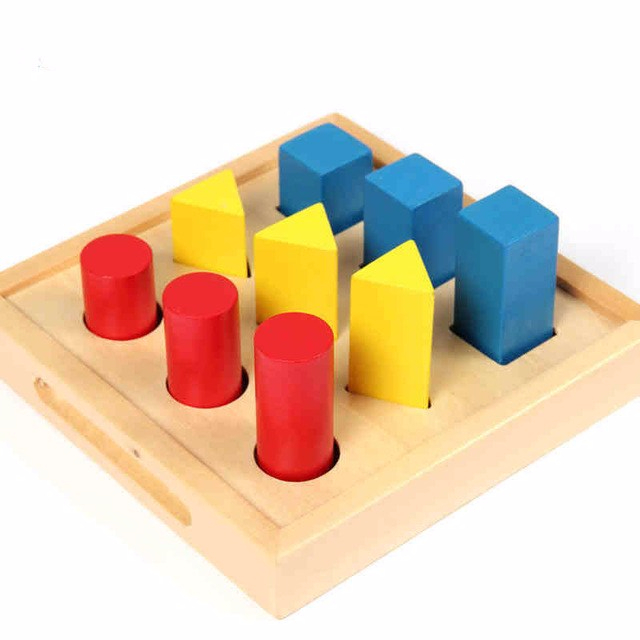
Given my pattern design was more abstract in style, I decided to create a graphic more geometric and structured for the alphabet design project. One of the first lessons I can remember learning in an educational setting is the idea of shapes and colors. In kindergarten my teachers had our class create art out of small cutouts of triangles, circles and squares. My class and I would then move these tiny shapes into one huge image like a mosaic. This summer I also nannied for a 2 year old girl who would play with a geometry shape board that consisted of the same three shapes of the triangle, circle and square. My inspiration for this project came from the idea of incorporating and manipulating those three different shapes in order to create an alphabet.

alphabetdesigninspiration2

“Baby Toy Montessori Geometry Shape Board” Source: AliExpress.com

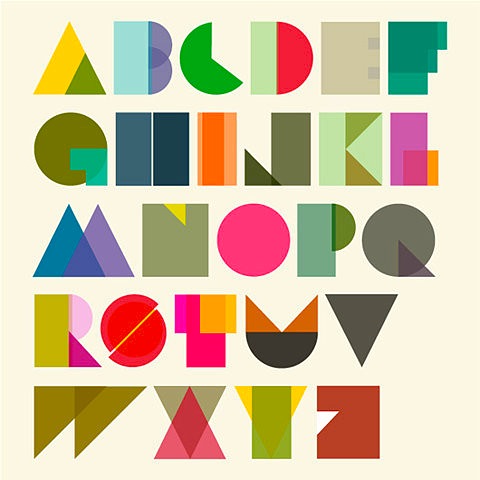
I also found two text examples in which different words are manipulated to form a shape. Words such as “thinking,” “creative” and “intelligent” are incorporated to form the shape of a lightbulb. The word “idea” is also printed in red to emphasize the theme of the image. A similar style is used for the second image in which words like “charm,” “kiss” and “romance” are shaped to form a heart. The word “love” is the boldest and printed the largest to display the overarching theme. For my project I want to portray a similar concept in my alphabet. However, instead of using letters to form a shape, I want to use shapes to form letters.

My alphabet will be modular since it is created through the manipulation of 3 different shapes and 3 different colors. Like the image above, the circles will be constructed in red, triangles in yellow, and squares in blue. Color overlap between the different shapes will result in the same reaction that occurs when primary colors interact on the color spectrum. The same three shapes will be used but will be manipulated to create a letter. For instance, a square may be stretched into a rectangle in order to create the side of the letter L.

This project will be constructed primarily through Adobe Illustrator. The digital tools I will use to create this alphabet design will include vector graphics as well as manipulating the scale to turn the primary shapes into readable letters. No aspect of this project will incorporate handwriting, scanning or printing. All elements of my alphabet design project will be manufactured through computer programs.

alphabetdesigninspiration1

“Tim Fishlock – Alphabets” Source: Creative&Live

Posted in Fall 2017 Archive (336), Uncategorized | Leave a comment

Alphabet Design Proposal: Kim Santos

I was very interested in the currency section of the Library’s Manuscripts and Archives collections. I enjoyed the font and visual art that went into a lot of it. It got me thinking about themes and the way you can promote certain things through typography.

A significant issue I hold close to me is coral reefs. As someone who grew up on a tropical island, the ocean is apart of my home, along with the life within it. I thought about ways I could of about this project, thinking about how I can contribute to an issue that really means something to me. I looked through Coral Reef Promotional Posters and noticed that although the images served its purpose, there wasn’t anything that really drew my attention to it. Aside from the colors itself, I didn’t find much appealing.

With this being said, I decided I wanted to base my font creation off of coral reefs. I want to somehow study their anatomy and find a way to form letters from it. I am hoping to utilize it in my very own promotional poster of saving coral reefs. I figured using the coral as the font itself could be analytical in helping show just how important they are.

To execute the assignment, I would start by taking photos of coral and masking them out in Photoshop. I then plan to bring the masked images into Illustrator and use the pen tool to somehow find a way to create letters out of them. I haven’t decided yet if I wanted to do the alphabet in uppercase or lowercase. I’m concerned with how cohesive they all would be based on the way I design them. So, this is something that I will be thinking about as I continuing editing my photos on photoshop.

Posted in Fall 2017 Archive (336) | Leave a comment

Alphabet Design Proposal: Allison Cissna

For this project I was inspired by creating something more natural and since my soccer season is about to start up again I thought it would be a good idea to use grass as a texture and potentially a block style font since a soccer field is rectangular. Ive seen tons of fonts just like it where it involves grass or dirt so I think this would definitely be doable. The text source I was inspired by is the “Eat Pray Love” book that has font on the front created through organic material. The subject of the book is a romance novel of a women traveling around to just escape the place she used to be in. It sets a very adventurous yet romantic mood which is very interesting. I want the readers to really get a sense of being outside and adventurous along with a romantic feel. I will use a materials based design in order to create the organic shapes but I will also manipulate the shapes in Illustrator. I think using materials for this theme would be the only way to truly capture my idea. I will use my best friends camera in order to capture my images of the grass and then save those on my computer. Once the images are saved then I will mess with them on photoshop to get the right contrast that I think will be a good fit for my font. Then I will use Illustrator to apply the grass texture to my font.


Posted in Fall 2017 Archive (336) | Leave a comment