
For my Final Digital Comic Collage, I wanted to show my audience a little taste of who I am based on the things I like and the thing I love to do the most: draw. I decided to use some of my drawing/art I’ve done recently is to show my audience what I can do and what my interests are. My comic fits into McCloud’s definition because I made a structured collage to give my audience an inside scoop of who I am without using any words. I wanted to make more of a image rather than an original comic because I feel like my art and how they are placed can give my audience the freedom to figure out why certain images are placed in certain parts of my comic.
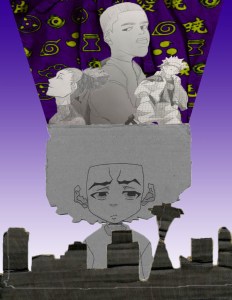
Final Digital Comic Collage – Completed on 10/2/19
The other reading, John Lovett’s Design Overview, helped me think about my composition on my collage by using texture, colour, and contrast. I used texture in my layering process with my art. I used consistent colour throughout my collage, using black, white, gray (drawings), purple and yellow. Finally, I used contrast in my background to indicate a sunset behind my city art.
I have used Photoshop before last semester but it was a good review for me with our first project. I honestly feel like I improved on photoshop, however, I do feel like I could’ve really explored this site more had I owned this site on my personal computer. Because of this, trying to regain my knowledge on Photoshop and learn new techniques were a struggle for me. The tool I used the most was the Quick Selection Tool to crop all of my art and make it organized. I did have trouble adding my fabric within a specific shape but I went back to the tutorials and was able to figure it out. I enjoyed using Photoshop because I was able to improve my knowledge on how to operate this site. I hope to improve more on this site and Illustrator as well in the future.
 Kristin Becker's DTC Classes at WSU